
PDF Size Reducer: Shrink PDF
Not claimedMake oversized PDFs fit forms, email, application portals, and document-upload…
By Asil Arslan · UtilitiesWhy we expect it: Clear value, careful documentation, and fully on-device processing make this PDF shrinker a promising, privacy-friendly utility.



About
Make oversized PDFs fit forms, email, application portals, and document-upload limits—without sending your files to a server.
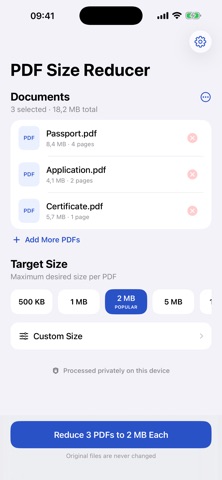
CHOOSE THE LIMIT THAT MATTERS Select a maximum size for each PDF: 500 KB, 1 MB, 2 MB, 5 MB, 10 MB, or a custom KB/MB target. PDF Size Reducer analyzes each document and searches for the highest readable quality that fits your chosen limit.
REDUCE ONE PDF OR A WHOLE BATCH • Select multiple PDFs at once • See file size and page count before processing • Follow real per-document processing stages • Continue the batch if one file fails • Save or share every completed PDF
QUALITY-AWARE REDUCTION The app adapts quality and resolution to the document instead of exposing technical compression controls. It validates the output page count and preserves page order, dimensions, and orientation. If the requested target cannot be reached while keeping a usable PDF, the app labels the best reasonable result instead of claiming success.
PRIVATE BY DESIGN PDF processing happens directly on your device. There is no account, no login, no document upload, and no cloud PDF-processing service. Originals are never overwritten. Temporary processing files are cleaned up, and completed files leave the app only when you explicitly save or share them.
BUILT FOR REAL DOCUMENT WORK • Maximum size target per PDF • Custom size entry in KB or MB • Controlled batch processing for large files • Clear handling for protected, damaged, or unsupported PDFs • Light and dark appearances • Dynamic Type and VoiceOver support
FREE AND PREMIUM ACCESS One successfully generated PDF reduction is included free. The free use is not consumed when file selection is cancelled, processing fails, or no usable target-reaching result is created.
Premium unlocks unlimited reductions and batch processing through weekly or yearly auto-renewable subscriptions. Prices, billing periods, and any available offer are supplied by the App Store before purchase. A 3-day free trial is shown for the weekly plan only when the App Store provides that offer and confirms eligibility for the account. Subscriptions renew automatically unless cancelled and can be managed in App Store account settings.
Offer availability and eligibility may vary by account and storefront.
Privacy Policy: https://asilarslan.github.io/pdf-size-reducer/privacy-policy/ Terms of Use: https://asilarslan.github.io/pdf-size-reducer/terms-of-use/ Support: https://asilarslan.github.io/pdf-size-reducer/support/
People rate it
Sign in to rate this app. Honest is what counts.
No ratings yet. Tried it? Be the first to rate it.
More Utilities apps
Best new Utilities apps this week Drainly: Speaker CleanerMuffled speaker after a splash, rain, or a sweaty workout?
 Photo & PDF Resize: KBFile too large to upload?
 Arvectum Proxy LauncherArvectum Proxy Launcher is a network utility that routes your iPhone through a proxy you…
 Vodoalarm: vodostaji BiHVodoalarm javlja kad tvoja rijeka naglo raste, pa ne moraš stalno gledati vodostaje
 FairAuth: AuthenticatorFairAuth creates the codes for two-step verification on iPhone and iPad
 Polarglow: Aurora AlertsKnow tonight's chance of seeing the aurora where you are, and never miss a storm night