
PDF Tool Pro für iPhone & iPad
Not claimedMost PDF tools on the web start by asking you to upload your file
By Rainer Duerr · ProductivityWhy we expect it: A privacy-first PDF toolkit with clear value, a one-time purchase and thoroughly explained features.




About
Most PDF tools on the web start by asking you to upload your file. With a contract, an invoice or a medical record, that is not a small thing.
PDF Tool Pro works entirely on your iPhone and iPad. No upload, no account, no background service. A file leaves your device only if you save or share it yourself.
SCANNING
Capture documents with the camera: edges are detected automatically and the page is straightened. Several pages become one PDF.
MERGE AND SPLIT
Combine several PDFs into one document in the order you choose. Extract single pages – the page preview shows exactly what you are selecting.
MAKE IT SMALLER
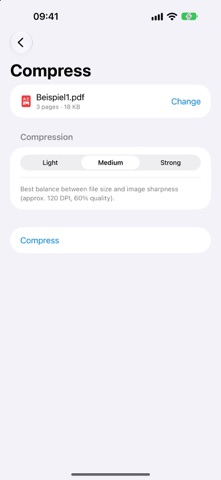
Reduce file size at a level you pick. Useful for anything that has to go out by email or into an upload form.
PUT PAGES IN ORDER
Rotate, delete and reorder pages, with a preview of each one.
IMAGES AND PDF
Combine photos from your library or from Files into a PDF – or save individual pages as images.
People rate it
Sign in to rate this app. Honest is what counts.
No ratings yet. Tried it? Be the first to rate it.