
PdfCAS
Not claimedPdfCAS brings PDF editing, page layout and plan review to iPhone and iPad
By Complex Automation Systems GmbH · ProductivityWhy we expect it: Its thorough, honest description and clear focus on PDF editing and plan review make it a promising productivity app.




About
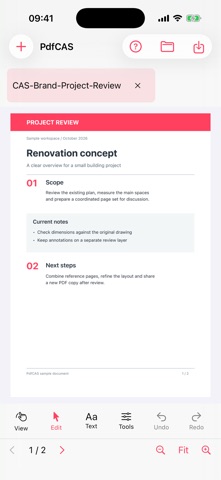
PdfCAS brings PDF editing, page layout and plan review to iPhone and iPad. Open a file from Files or start with a blank page, then work on the page with touch controls.
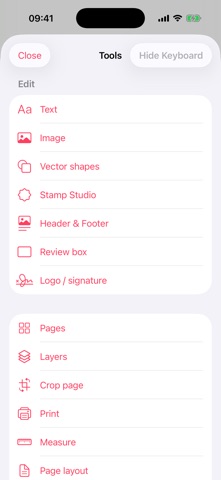
EDIT AND ORGANIZE Select, move, resize and duplicate PDF objects. Edit supported text with font, size, color and paragraph controls. Add or replace images from Photos or Files, including your own logo or handwritten signature. Search document text and add review marks, stamps, watermarks, headers and footers.
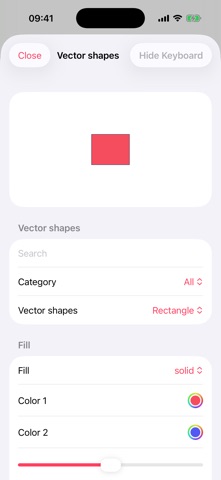
COLOR AND VECTOR TOOLS Choose text and shape colors with the iOS color palette, RGB sliders or a HEX value. Place editable vector shapes and adjust their fill and color. Save a new PDF copy with your edits.
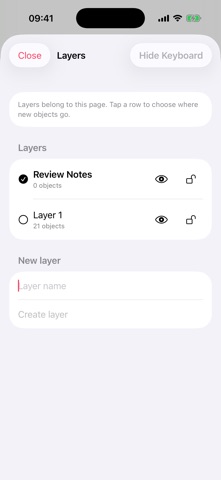
PAGES AND LAYERS Insert, rotate, reorder, merge and extract pages. Create named layers for each page, move selected objects between them, and show, hide or lock content. Crop visible margins with automatic detection or millimetre measurements and check the preview before applying.
PLAN REVIEW AND PUBLICATION Use page dimensions, rulers and layout guides when reviewing technical drawings. Calibrate against a known distance before measuring a plan. Build a book or magazine layout with columns, images, page numbers and linked contents; keep its editable source and export a PDF. Print through the iOS print preview.
WORK LOCALLY PdfCAS processes document content on your device without a PdfCAS account. Save a new PDF copy so the original stays intact. Files stored with iCloud or another provider may sync according to that provider’s settings.
PDF editing depends on the source file. Scanned-image text requires OCR, which PdfCAS does not provide. Signed and encrypted PDFs open read-only. Verify the source scale and calibration before technical measurements.
People rate it
Sign in to rate this app. Honest is what counts.
No ratings yet. Tried it? Be the first to rate it.