
PDFwink: PDF Scanner & OCR
Not claimedSnap a page and get a clean PDF
By LIN SZU-LIANG · ProductivityWhy we expect it: The clear, privacy-focused description and broad, practical PDF toolset make this a promising app for document work.



About
Snap a page and get a clean PDF. Scan, convert, sign and add your logo: 40+ PDF tools that all work on your iPhone.
No sign-in, no ads, and your documents are never uploaded to us.
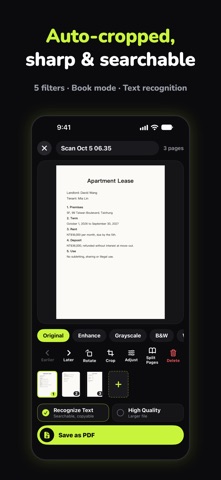
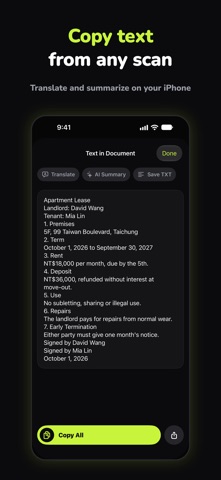
SCAN — FREE FOREVER • The iPhone document camera finds the page edges and straightens them. 5 filters make text sharper. • Text is recognized as you save, so your PDFs are searchable and copyable. • Book mode splits one photo into two pages. Whiteboard mode cleans up the background. • ID Card Mode puts both sides of an ID on one A4 page, with an optional "For rental use only" watermark.
CONVERT • PDF to Word, Excel, PowerPoint, images, long image, or TXT. • Photo to Excel: turn a paper table into a spreadsheet. • Word, Excel, PowerPoint, web pages, TXT and CSV to PDF. • Templates: quote, receipt, meeting notes, résumé, cover letter, weekly planner.
EDIT & SIGN • Add text, pen, highlighter, correction tape, cover & retype, and redact (the text underneath is really removed). • Draw your signature or photograph a stamp (background removed automatically), then sign right on the PDF. • Fill in PDF forms, add page numbers and watermarks. • Add your logo to a corner or the center, or tile it across the page like stock-photo watermarks. Works on photos too.
PAGES & SECURITY • Merge, split (every page, by range, at blank pages, or by bookmarks), organize, rotate, and compare two PDFs. • Compress, add or remove passwords, and repair broken PDFs. • Folders, full-text search, and Recently Deleted for 30 days.
TRANSLATE & AI • Translate whole documents or photos with Apple Translation (offline after downloading the language pack). • AI Summary (requires an iPhone that supports Apple Intelligence).
IMAGE TOOLS • Compress, resize, convert to JPG/PNG/HEIC, collage, date stamp, and stitch long images.
PDFWINK PRO • The basics are free and unlimited forever: scanning, saving to PDF, sharing, merging, compressing, logos, watermarks... • Each Pro tool is free once a day, so you can try it first. • Pro unlocks unlimited use, plus batch processing and iCloud Sync (see your documents on iPhone, iPad and Mac). • 30-day pass, 1-year pass, or lifetime. You pay once. Passes simply end when they expire and never renew or charge you automatically.
DONE ON YOUR IPHONE • Scanning, text recognition and conversion all happen on your iPhone. Your documents are never uploaded to us. • No sign-up, no ads, no tracking.
— Terms of Use: https://www.apple.com/legal/internet-services/itunes/dev/stdeula/ Privacy Policy: https://sites.google.com/view/nfnofriends/pdfwink-privacy
People rate it
Sign in to rate this app. Honest is what counts.
No ratings yet. Tried it? Be the first to rate it.