
Photo Print Size: Exact Inches
Not claimedArrange selected photos by finished dimensions and copy count, then preview and export a…
By 凡 魏 · UtilitiesWhy we expect it: Clear, careful description and on-device privacy make this a promising utility for precise photo printing.


About
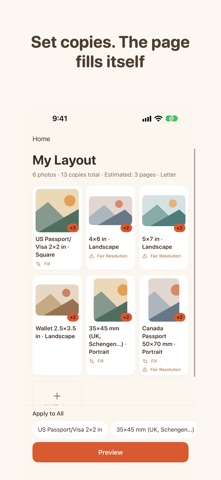
Arrange selected photos by finished dimensions and copy count, then preview and export a PDF for your chosen paper size. Photos and layout drafts are processed and stored on your device. The app does not upload your photos to our servers.
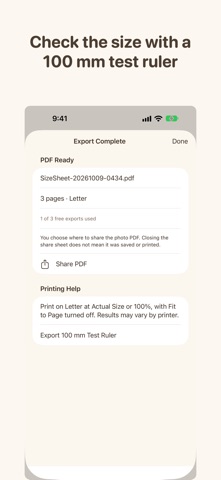
Export a PDF and check it with the included 100 mm test ruler.
Add photos from your library, the Files app, or the clipboard.
Set dimensions and quantities
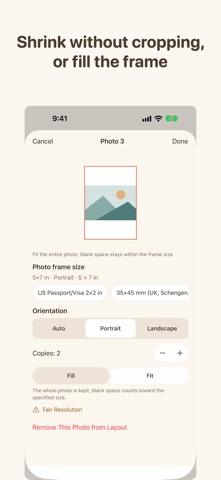
Choose photos, set dimensions for the group, and adjust individual dimensions, orientation, and copy count when needed. Use automatic, portrait, or landscape frames. The frame can change orientation; the photo itself is not stretched. The app supports up to 50 selected photos.
Choose Fit or Fill
Fit keeps the full image inside the frame and may leave blank space. Fill covers the frame and crops the image; you can adjust the crop position. Face-based crop suggestions, when available, are generated on-device. Your manual crop remains in place unless you ask for a new suggestion.
Preview and print
Review the pages before exporting. Print on the selected paper size using “Actual Size” or “100%” and turn off “Fit to Page.” The separate test-ruler PDF follows the selected paper size in the app. Its vertical line is 100 mm. The horizontal line is 100 mm on A4, Letter, A5, and 5×7; 90 mm on 4×6; and 70 mm on L size (Japan). Each nominal line length is printed on the page. Use the marked lengths to check each print workflow with a physical ruler; printer, driver, and PDF app settings can affect output.
Print at home or use a print shop that accepts PDFs. Check that the service supports your PDF and selected paper size before printing.
Local photo handling
Photos and layout drafts stay on your device and are not uploaded to our servers. Clearing drafts removes the app’s local draft and photo copies, not the originals in your photo library. If you share an exported PDF, you choose the destination through the system share interface. Opening a website link visits the linked website in your browser.
People rate it
Sign in to rate this app. Honest is what counts.
No ratings yet. Tried it? Be the first to rate it.