
Photo Recovery: Find & Vault
Not claimedThousands of photos sit on your iPhone that the Photos app never puts in front of you
By MAYUR GORDHANBHAI SAVSAVIYA · Photo and videoWhy we expect it: A clear, privacy-first recovery tool that finds hidden iPhone photos and makes them easy to bring back.



About
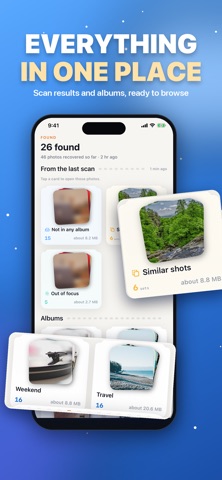
Thousands of photos sit on your iPhone that the Photos app never puts in front of you. Photo Recovery finds them in one scan, groups them by where they were hiding, and lets you bring back the ones you want.
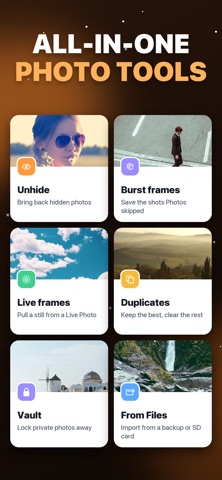
ONE SCAN, SEVEN PLACES • Hidden photos: everything tucked away in the Hidden album • Burst frames: the shots Photos keeps out of view after a burst • Live Photo frames: the seconds of extra frames inside every Live Photo • Not in any album: photos you took but never filed • Screenshots: captured, then forgotten • Similar shots: near-identical photos, grouped, with the sharpest one marked • Out of focus: blurry shots worth checking for a sharper copy
BRING THEM BACK Tap the photos you want and choose what happens: unhide them, save burst frames to your library, pull a still frame out of a Live Photo, or file them into a "Recovered" album so you can find them again.
KEEP THE BEST SHOT Similar photos come grouped in sets, with the sharpest one already marked to keep. Pick a different one with a tap, then clear the rest in one go. Anything you remove goes to Recently Deleted, so you can still change your mind.
A PRIVATE VAULT Move private photos into a vault that opens with Face ID. Vault photos are encrypted inside the app and never appear in the Photos app, the Files app, or the app switcher.
RECOVER FROM FILES Got old photos on a computer backup, an SD card or iCloud Drive? Pick them in the Files app and they go straight into your library's "Recovered" album.
PRIVATE BY DESIGN • Every photo is checked on your iPhone. Nothing is uploaded. • No account, no sign-up, no ads, no tracking. • Available in 29 languages, in light and dark mode.
GOOD TO KNOW Once a photo has been emptied from Recently Deleted, iOS removes it for good and no app can reach it. Photo Recovery finds the photos that are still on your phone but out of sight.
Privacy Policy: https://sites.google.com/view/photo-recovery-find-vault/home
Terms of Use: https://sites.google.com/view/photorecoveryfindvault/home
EULA :- https://sites.google.com/view/photo-recoveryeula/home
People rate it
Sign in to rate this app. Honest is what counts.
No ratings yet. Tried it? Be the first to rate it.