
PhotoView: EXIF Photo Viewer
Not claimedEvery photo remembers how it was taken
By Detlev Voss · Photo and video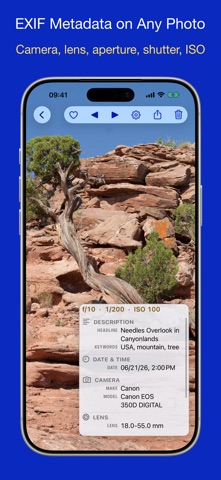


About
Every photo remembers how it was taken. PhotoView shows you — camera, lens, aperture, shutter, ISO, location and IPTC — in an overlay you can dismiss with a single tap.
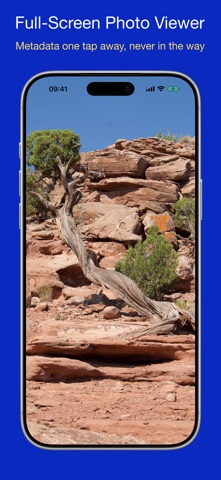
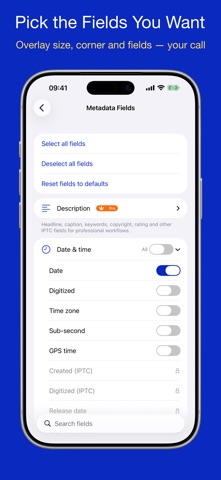
A full-screen viewer for the photos, Live Photos and videos already in your library, with the technical story one tap away. You choose which fields appear, how large the overlay is and which corner it sits in. Not an endless list — exactly what you care about.
VIEW • Browse your whole library, your own albums, shared albums and smart albums. • Photos, Live Photos and videos full screen. Swipe or use the arrow keys, pinch or ⌘+ to zoom, double-tap for fit or fill. • Mark favorites — one photo, or a whole selection at once. • Multi-select to add to an album, remove from an album, delete, or play as a slideshow. • Create albums and folders while you browse.
METADATA • Camera and lens — make, model, lens, aperture, shutter speed, ISO, focal length with 35 mm equivalent, exposure program, metering, white balance and flash, decoded into plain language. • Computational capture — HDR gain maps, depth and disparity, portrait and segmentation mattes, spatial and cinematic video, time-lapse and slow motion, Live Photo identifiers. • Video — duration, codec, frame rate, bit rate, audio codec, sample rate and channels. • Your layout — pick the fields, set the size (small, medium, large), drag the overlay into any corner. • Built-in help explains every group and every field — and the app itself.
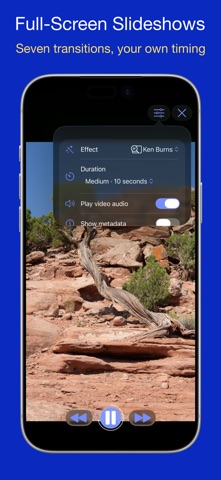
SLIDESHOWS & AIRPLAY • Full-screen slideshows with seven transitions — Ken Burns, crossfade, slide, push, zoom, cut or shuffle — a per-slide duration, and play, pause and step controls. • Send a photo, video, Live Photo or a running slideshow to the big screen over AirPlay from iPhone and iPad — relaxed viewing with family and friends. The big screen shows the picture only, never the toolbar and never the metadata. • Designed for iOS 26 and macOS 26, with Liquid Glass materials throughout.
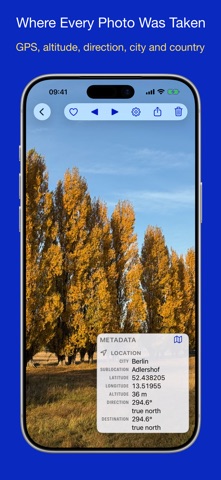
PHOTOVIEW PRO • IPTC — headline, caption, keywords, title, rating, creator, credit, source, copyright, usage terms, city, region and country, plus the full IPTC Extension set: people, events, artwork, image regions, alt text, releases and licensing. • Location — GPS coordinates with altitude, direction and precision; open any geotagged photo on a map. • RAW and desktop metadata — DNG raw-pipeline tags, embedded XMP from Lightroom, Capture One and Photoshop (ratings, labels, keyword trees, edit history, drone telemetry, panorama), AI and generative-provenance fields, plus Canon and Nikon maker notes. • On Mac — open a folder or files dropped from the Finder, give any photo a window of its own, and read Finder tags, comments and where-from.
Free to use. Try Pro free for 7 days — no card, no auto-renew, nothing to cancel. Then unlock it for good with a single one-time purchase. No subscription.
Privacy first: every field is read on your device. Your photos are never uploaded, and there is no tracking and no advertising. Only your settings can sync across your devices through your own iCloud, or be exported as a JSON backup.
Universal: one purchase covers iPhone, iPad and Mac.
For photographers checking gear and settings, archivists cataloguing shoots, retouchers verifying IPTC and rights — and anyone curious about how a picture was made.
Questions or feedback? Use the contact link on the help screen — we read every message.
People rate it
Sign in to rate this app. Honest is what counts.
No ratings yet. Tried it? Be the first to rate it.