
Piola — Menu Bar Pull Timer
Not claimedPiola is the fastest way to set a timer on your Mac
By Michael Green · ProductivityWhy we expect it: Piola's pull-to-start menu bar timer is a clever, clearly explained idea with strong value for everyday Mac users.

In short
Piola is a Mac menu bar timer that starts with a pull-down gesture, a dial, or typed input, and counts down live in the menu bar. It suits anyone who needs timers for cooking, focused work, meetings, or breaks. One standout feature is a global shortcut that opens typed entry from any app, with no mouse needed.
Summary by Debuts, based on the App Store listing.About
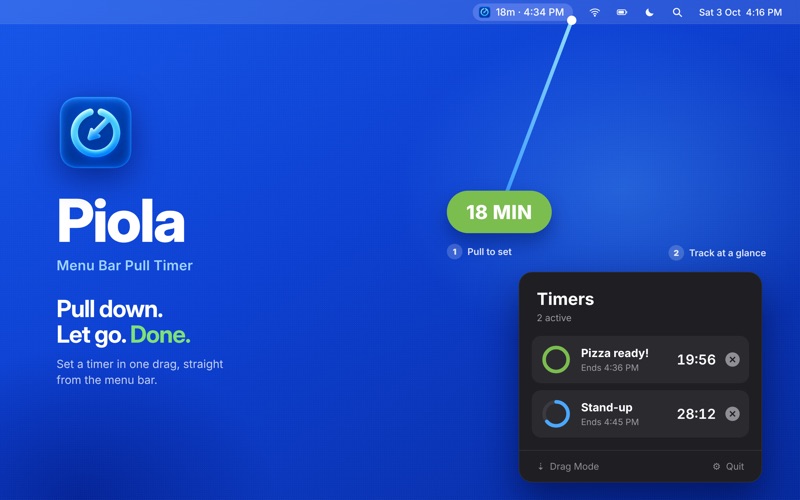
Piola is the fastest way to set a timer on your Mac. Pull down from the menu bar, stretch to the time you want, and let go. Your timer starts instantly and counts down right in the menu bar.
No windows to open. No buttons to click. Just pull, release, and get back to what you were doing.
THREE WAYS TO START A TIMER
- Drag Mode – Stretch the handle down from the menu bar and release to start. The farther you pull, the longer the timer. - Dial Mode – Choose a duration with the dial and quick presets. - Input Mode – Type a duration or a time, and add an optional purpose like "Pizza ready!" or "Stand-up."
Pick the style that suits you in Settings and switch any time.
START A TIMER FROM ANYWHERE
Press the global shortcut (⌃⌥T by default) from any app to open Input Mode and start typing immediately. No mouse required.
KEEP TRACK AT A GLANCE
- See the countdown live in your menu bar - Run multiple timers at once - Click the menu bar to see every active timer, its purpose, and exactly when it ends - Optionally show the number of active timers next to the countdown - Choose colon format (1:03:00) or short format (1h 3m) for longer timers - Set timers up to 24 hours
ALERTS YOUR WAY
- Pick from a selection of alert sounds and preview them before choosing - Adjust alert volume - Get a pre-alert before a timer finishes, so you're never caught off guard - Works with macOS notifications, including persistent alerts that stay on screen until dismissed
BUILT FOR YOUR MAC
People rate it
Sign in to rate this app. Honest is what counts.
No ratings yet. Tried it? Be the first to rate it.
More Productivity apps
Best new Productivity apps this week ChickMark: Habit TrackerChickMark is a simple habit tracker for routines, goals, and reminders
 Dayflint: One Thing a DayToo many priorities?
 Snappy Do ItSix connected modes. One traceable journey.
 Fristo CAFMFristo is the app for Fristo CAFM, the facility management software
 UhWhat? Voice NotesCatch the thought before it disappears
- BeginAnywayMorning alarm for hard tasks: set one task, prove you started, build a streak