
Pixelator
Not claimedPixelator is a fun pixel art studio for iPhone, built for sharp grids, clean tools, and…
By PETER JOHN WRIGHT · Photo and video


About
Pixelator is a fun pixel art studio for iPhone, built for sharp grids, clean tools, and art you can share.
DRAW! • Brush, eraser, pen, fill, and scatter • Shapes: line, rectangle, circle, triangle, star, and arrow • Select and move pixels with precision • Adjustable brush size and shape
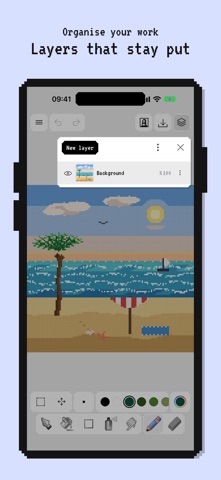
LAYERED WORKFLOW! • Stack, hide, lock, and reorder layers • Opacity control and merge down • Undo through your edit history
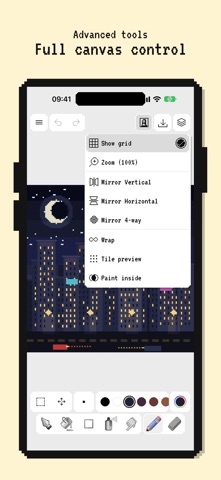
CANVAS TOOLS! • Symmetry: vertical, horizontal, or 4-way • Grid, wrap mode, and paint-inside options • Canvas sizes from tiny sprites to larger grids (8×8 to 128×128 and custom)
PALETTES! • Curated palettes: Pico-8, Game Boy, NES, Sweetie 16, DB16, DB32, and more • Create and manage your own palettes • Full-spectrum color picker with recent colors
EXPORT & SHARE • PNG at any scale for crisp upscales • SVG for clean vector-ready pixel art • Import images and pixelate them onto your canvas
APPLE INTELLIGENCE* • Invent drawing names from what’s on the canvas • Generate fresh color palettes — all on device
Also draw on Apple Watch with a lightweight companion editor.
Whether you’re making game sprites, icons, stickers, or weekend doodles, open Pixelator, paint a few pixels, and make something that looks like it came from a cartridge. *Apple Intelligence features require a compatible device and availability.
People rate it
Sign in to rate this app. Honest is what counts.
No ratings yet. Tried it? Be the first to rate it.