
Pocket/Monitor
Not claimedCheck your mix on your actual iPhone speakers while you work
By Bojan Radivojevic · Music and audioWhy we expect it: Clear value and honest details make this a promising tool for producers checking mixes on iPhone speakers.



About
Check your mix on your actual iPhone speakers while you work. Pocket Monitor sends stereo audio from your Mac or Windows computer over a USB data cable.
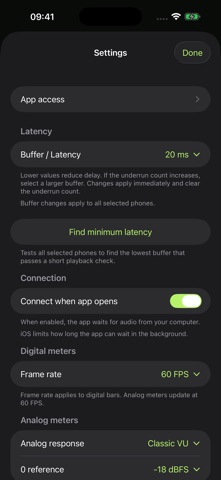
Use the free desktop sender for computer audio, or install the included VST3 plugin in a compatible DAW. The phone includes Mono, Mute and Solo controls, digital or analog meters, and adjustable playback buffers.
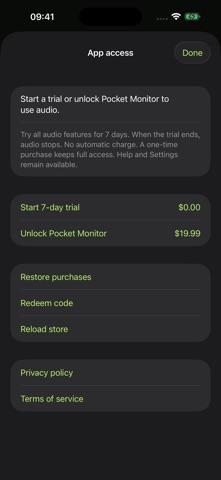
Start a 7-day trial to try all audio features. The trial does not charge or renew automatically. A one-time in-app purchase keeps full access. Purchases can be restored with your Apple account.
A computer and a USB data cable are required. Unlock your device, trust the computer, and open Pocket Monitor. Windows also requires Apple Devices or Apple Mobile Device Support.
The iOS connection uses USB. Logic Audio Unit support and Wi-Fi are planned features and are not included. The displayed buffer setting is not the total speaker latency.
People rate it
Sign in to rate this app. Honest is what counts.
No ratings yet. Tried it? Be the first to rate it.