
PocketCopier
Not claimedPhotocopy any page with your phone
By Froggy Eye Ltd · ProductivityWhy we expect it: Clear, well-explained value with privacy-first design, a useful one-time Pro model, and a focused niche make this a promising productivity debut.




In short
PocketCopier is a productivity app that turns phone photos of documents into straightened, black-and-white copies saved as PDF or PNG. It suits people who need to send a letter, form, receipt or contract without a scanner or printer. One thing that stands out is that all processing happens on the phone and no account is required.
Summary by Debuts, based on the App Store listing.About
Photocopy any page with your phone. PocketCopier finds the page, straightens it and gives you a clean black-and-white copy as a PDF.
No scanner handy and no printer nearby? Point your camera at a letter, form, receipt or contract and get back what a photocopier or copy machine would give you: a square, sharp copy with the shadows removed, ready to send.
CROOKED PHOTO, STRAIGHT COPY • Auto-align finds the edges of the page and squares it up, even when you shot it at an angle on a busy desk. • Photocopy mode removes shadows and turns gray paper white, so the text stays crisp. • When the edges are unclear, the page is flagged for you to check rather than cropped wrongly. • Adjust corners lets you drag each corner into place yourself whenever a page is tricky.
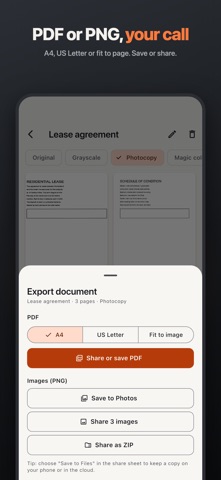
EVERY PAGE IN ONE PDF • Scan several pages in one go, or add more later. • Reorder, rotate, retake or delete pages. • Export a multi-page PDF on A4, US Letter or fit to page. • Or save each page as a PNG image to Photos, or share it.
CHOOSE THE LOOK • Photocopy (black and white), Grayscale or Original. • Magic colour with Pro: white paper, with the ink colors kept. • A before and after view on every page.
ALREADY TOOK A PHOTO? Import it from Photos and PocketCopier straightens and cleans it up the same way.
YOUR COPIES STAY ON YOUR PHONE • No account and no sign-in. • No ads. • Pages are processed on your phone, and your documents are kept in the app. • You decide when a copy goes anywhere else: share it, save it to Files or save it to Photos.
FREE AND PRO Free: unlimited documents, PDF and PNG export, no watermark, up to 5 pages per document and 5 pages a day.
Pro is a one-time purchase that removes the page limits and adds Magic colour and ZIP export. No subscription.
GOOD FOR Leases and rental applications, receipts for your taxes, signed letters, application forms, contracts, meeting notes, worksheets and homework.
Privacy policy: https://pocketcopier.froggyeye.com/privacy.html
People rate it
Sign in to rate this app. Honest is what counts.
No ratings yet. Tried it? Be the first to rate it.
More Productivity apps
Best new Productivity apps this week ChickMark: Habit TrackerChickMark is a simple habit tracker for routines, goals, and reminders
 Dayflint: One Thing a DayToo many priorities?
 Fristo CAFMFristo is the app for Fristo CAFM, the facility management software
- BeginAnywayMorning alarm for hard tasks: set one task, prove you started, build a streak
 DHUDEDHUDE Analityxs es la herramienta de gestión diaria para grupos de restauración y ocio…
 FTC BIOBUZZ Scorer & TrainerBIOBUZZ Scorer is a free, ad-free scorer for the 2026–2027 FTC season, built on…