
Pong - ICMP Network Utility
Not claimedPong sends genuine ICMP Echo Requests — the same protocol as the terminal ping command —…
By Glenn Samson · Utilities


In short
Pong ICMP Network Utility sends real ICMP Echo Requests from an iPhone or iPad, the same protocol the terminal ping command uses, rather than HTTP checks. It resolves hostnames and pings over IPv4 or IPv6, storing results locally with no account needed. The app suits anyone who wants genuine ping results, and it stands out for keeping all history on the device.
Summary by Debuts, based on the App Store listing.About
Pong sends genuine ICMP Echo Requests — the same protocol as the terminal ping command — directly from your iPhone or iPad. Not HTTP checks dressed up as pings. Real ICMP.
WHY IT MATTERS Many "ping" apps on iOS quietly fall back to HTTP requests because raw socket access is hard. Pong does the actual work. If a host is blocking ICMP, you'll see a timeout — not a false positive from a successful web request.
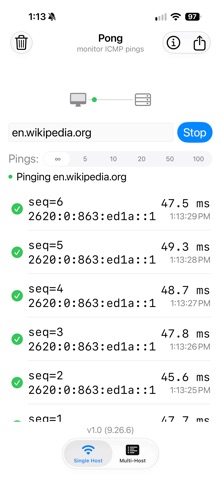
DUAL-STACK IPv4 & IPv6 Enter any hostname or IP address. Pong resolves it automatically and pings over whichever protocol the host supports — IPv4 or IPv6 — with no manual configuration required.
SINGLE HOST MONITORING Type or paste a hostname or IP, tap Start, and watch real-time ICMP results roll in. Sequence numbers, round-trip times, and timestamps are displayed as each ping completes. Tap any historical result to instantly re-ping that address.
PERSISTENT HISTORY All results are stored locally on your device. Your ping history is there when you come back, organized by host. No account required, no data ever leaves your device.
PONG PRO — UNLOCK MORE A single one-time purchase unlocks four additional features:
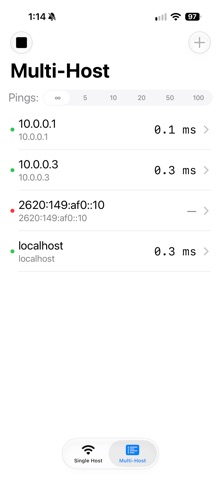
Multi-Host Monitoring — import a list of hosts from a text or CSV file and ping all of them simultaneously. Tap any host for a detailed session view. CSV Export — share your ping history as a spreadsheet-ready CSV file via AirDrop, Mail, or Files. Custom Ping Count — run exactly 5, 10, 20, 50, or 100 pings per session instead of continuous. Clear All History — wipe the complete ping history across all hosts in one tap.
No subscription. Pay once, own it forever.
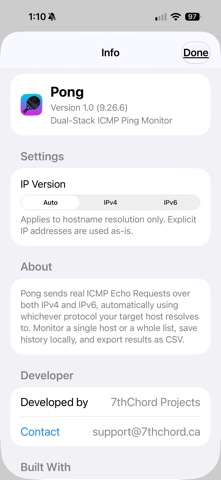
BUILT RIGHT Pong is written in Swift and SwiftUI with SwiftData for local persistence. It uses raw ICMP sockets — no third-party networking libraries, no analytics SDKs, no tracking of any kind. Your hostnames and results never leave your device.
People rate it
Sign in to rate this app. Honest is what counts.
No ratings yet. Tried it? Be the first to rate it.
More Utilities apps
Best new Utilities apps this week Drainly: Speaker CleanerMuffled speaker after a splash, rain, or a sweaty workout?
 Photo & PDF Resize: KBFile too large to upload?
 Arvectum Proxy LauncherArvectum Proxy Launcher is a network utility that routes your iPhone through a proxy you…
 Look Twice: Scam & AI CheckLook twice before you click
 Vodoalarm: vodostaji BiHVodoalarm javlja kad tvoja rijeka naglo raste, pa ne moraš stalno gledati vodostaje
 Ham Radio IQHam Radio IQ answers one question: which band is open right now, from where you are, and…