




About
Keep two knitted pieces on the same plan.
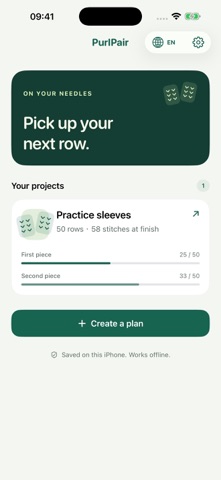
PurlPair helps you plan increases and decreases, check the expected stitches, and keep your place while knitting. Calculate a plan from your target or enter the shaping phases from your own pattern.
CALCULATE FROM A TARGET Enter starting and target stitch counts, section length, and stitches per change. Distribute changes across all, odd, or even rows. See the exact shaping rows and final count before applying. If the numbers cannot make a valid plan, the app explains what to adjust.
EXPLORE YOUR PLAN Touch or drag the stitch-count chart, move the row slider, or jump between shaping rows. See the instructions and expected stitch count at the selected row, then open that row in the full schedule. The chart also marks each piece’s saved progress.
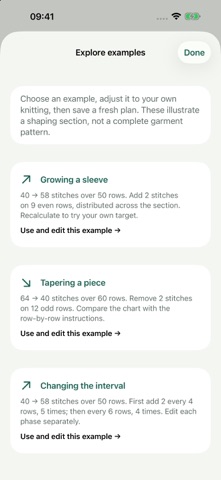
LEARN WITH EDITABLE EXAMPLES Explore original examples for growing a sleeve, tapering a piece, and changing the shaping interval. Edit the values and save your own fresh plan. Examples illustrate shaping sections, not complete garment patterns.
ONE PLAN, TWO PLACES Use one shared plan for a pair of sleeves, socks, or other matching pieces. Each piece keeps its own finished-row count, so you can switch between them or start the second later.
KNOW WHAT TO DO NEXT See the row to work now, its increase or decrease, the expected stitch count after it, and the next shaping row. Tap once after finishing the row. Undo a row or correct your progress when needed.
KEEP YOUR NOTES Save multiple projects with technique reminders and notes. Add sequential shaping phases when the spacing changes. Reuse a finished plan with a fresh copy.
TAKE A COPY WITH YOU Share a plan as text. Export and restore a backup through Files. Your saved projects and counters work offline.
Made for iPhone, with English and French, support for larger text, and light and dark appearances. One paid download includes all features. No account, subscription, ads, or analytics SDK.
Use your own pattern for stitch technique, placement, and right-side or wrong-side instructions. Row counts refer to the section you enter; PurlPair does not detect your physical knitting. Projects stay on this iPhone, with optional file exports and iOS device backups. There is no automatic device sync.
People rate it
Sign in to rate this app. Honest is what counts.
No ratings yet. Tried it? Be the first to rate it.