
Pyrgus: Password Generator
Not claimedPyrgus makes strong passwords, passphrases, PINs and secret keys on your iPhone and iPad
By Mario Stefano Suharja · Utilities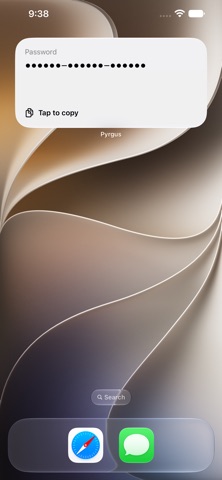

In short
Pyrgus: Password Generator creates passwords, passphrases, PINs and hex secret keys entirely on the device, with no account, network access or stored output. It suits anyone who needs a fresh secret on an iPhone or iPad. A standout detail is the Home Screen widget, which shows only dots in place of the password and copies a new one when tapped.
Summary by Debuts, based on the App Store listing.About
Pyrgus makes strong passwords, passphrases, PINs and secret keys on your iPhone and iPad. Everything is generated on your device with Apple's secure random number generator. There's no account and no network access, and nothing you generate is stored or sent anywhere.
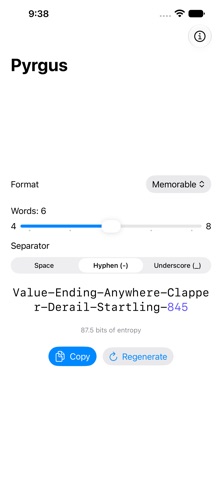
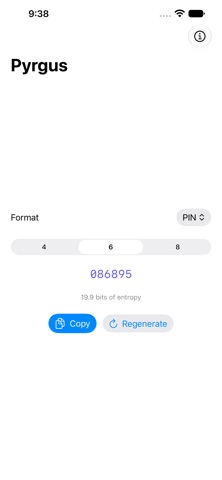
SIX FORMATS • Password: 18 characters in three easy-to-read groups, such as khduvn-xeRvpr-mzt7ai. Look-alike characters (l, I, O, 0, 1) are left out, so it's easy to type on another device. • Custom Password: any length from 6 to 32 characters, with or without symbols. The symbols are chosen so the password works in forms, config files and shells without escaping. • Memorable: 4 to 8 words from the EFF long wordlist plus three digits, joined by a hyphen, a space or an underscore. Easy to remember, easy to say aloud. • PIN: 4, 6 or 8 digits for door codes, phone locks and cards. • Secret 128 and Secret 256: 128- or 256-bit keys in lowercase hex, with no dashes, ready to paste into an API key field, a config file or an environment variable.
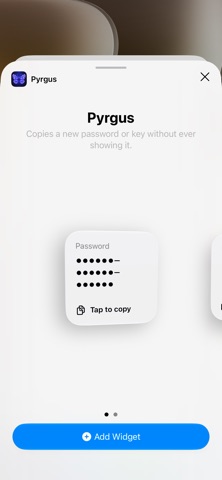
A WIDGET THAT NEVER SHOWS THE PASSWORD Add the Pyrgus widget to your Home Screen and tap it to copy a new password. The widget shows only dots in the shape of the format, so nobody looking over your shoulder sees the password. Each widget has its own format and options, so you can keep one for passwords and one for PINs.
HONEST STRENGTH Every password comes with its strength in bits of entropy, computed from the format itself. No colored bars, no "weak" or "strong" labels. Just the number.
A CLIPBOARD THAT FORGETS Tap the password or the Copy button. The clipboard clears itself after 90 seconds, so a secret doesn't sit there waiting to be pasted somewhere it shouldn't.
MADE FOR EVERYONE • VoiceOver spells each password character by character, including capital letters and separators. • Supports Dynamic Type, light mode and dark mode. • Long passwords wrap onto the next line instead of being cut off, so what you see is what you copy. • A larger layout on iPad, and it works in Split View and Slide Over.
PRIVATE BY DESIGN • No account, no sign-in, no ads, no analytics, no tracking. • No network access at all. It works in airplane mode. • Your format and options are remembered. Generated passwords never are.
ALSO ON MAC Pyrgus also runs natively on the Mac. It uses the same formats as the web version at p.mss.io, and both are checked against the same test vectors.
Memorable passwords use the EFF long wordlist, licensed CC BY 3.0 US.
People rate it
Sign in to rate this app. Honest is what counts.
No ratings yet. Tried it? Be the first to rate it.
More Utilities apps
Best new Utilities apps this week Vodoalarm: vodostaji BiHVodoalarm javlja kad tvoja rijeka naglo raste, pa ne moraš stalno gledati vodostaje
 NadhirNadhir is an independent app
 Rokey: Romanian KeyboardType Romanian without worrying about diacritics
 Vibe Island: AI Agent MonitorVibe Island is a command center for the AI coding agents running on your Mac
 Private AuthenticatorPrivate Authenticator keeps your two-factor authentication codes on your own Apple…
 Photo Clean: Photo CleanupA crowded camera roll?