
Q-Ai PDF
Not claimedQ-Ai PDF is a complete PDF toolkit: an editor, a converter, a document scanner, a…
By QBYTELAB-SARL · ProductivityWhy we expect it: A complete, privacy-focused PDF toolkit with clear value, thorough descriptions, and a broad audience make this a strong debut.




In short
Q-Ai PDF is a PDF toolkit with an editor, converter, document scanner, templates and AI writing for reports, proposals, CVs and slide decks. Its core tools run on the device without a connection, and only AI tasks send content to a server, which the app discloses each time. It supports twelve languages, including a full right-to-left layout for Arabic.
Summary by Debuts, based on the App Store listing.About
Q-Ai PDF is a complete PDF toolkit: an editor, a converter, a document scanner, a library of ready-made templates, and AI that writes documents and presentations for you.
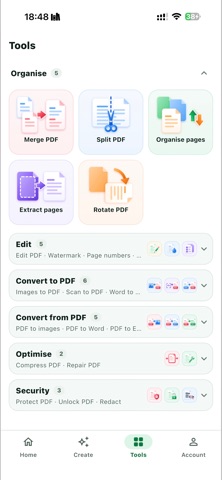
EDIT • Change the text of a page in place • Add text, pictures, shapes, notes and your signature • Fill in forms • Reorder, rotate or remove pages All on your device, without a connection.
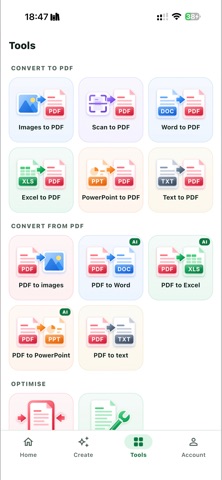
CONVERT AND ORGANISE • PDF to and from Word, Excel, PowerPoint, images and text • Merge, split, compress, protect, unlock, watermark, number pages and redact
SCAN Photograph a sheet of paper and get a clean page: found, squared, evenly lit and smoothed flat — creases and shadows gone.
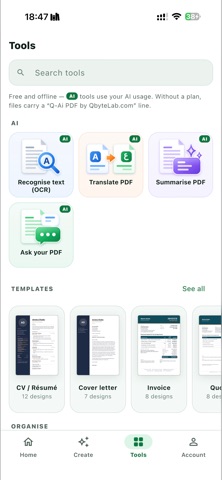
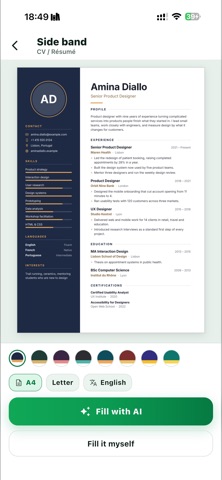
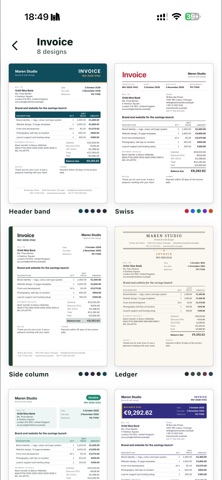
TEMPLATES CVs, invoices, quotes, receipts, certificates, letters and more, in many designs. Fill them in by hand with a live preview, or let AI fill them for you.
CREATE WITH AI Describe what you need and get a report, a proposal, a CV or a slide deck, written in front of you — then edit it and export it as PDF, Word or PowerPoint. Summarise, translate or ask questions of any PDF.
PRIVATE BY DESIGN The tools work on your device and your files stay there. Only AI tasks send content to our server, and the app says so each time. No ads, no analytics.
TWELVE LANGUAGES English, Arabic, French, Spanish, Portuguese, German, Russian, Turkish, Indonesian, Hindi, Chinese and Japanese — with a full right-to-left layout for Arabic.
FREE TOOLS, CLEAR PLANS Every tool that runs on your device is free. Without a plan, exported files carry a small line “Q-Ai PDF by QbyteLab.com”. A monthly plan removes that line and includes AI usage: • Starter — $4.99 per month • Plus — $9.99 per month • Pro — $24.99 per month • Max — $49.99 per month Larger plans include more AI usage. Each paid month starts with the plan’s full amount; what is not used does not carry over. Prices are in US dollars and may vary by country or region.
Plans are auto-renewable monthly subscriptions. Payment is charged to your Apple Account at confirmation of purchase. A subscription renews automatically unless it is cancelled at least 24 hours before the end of the current period. You can manage or cancel it in your Apple Account settings.
Terms of Use: https://qbytelab.com/ai-pdf-terms/ Privacy Policy: https://qbytelab.com/ai-pdf-privacy/ Support: https://qbytelab.com/ai-pdf-support/
People rate it
Sign in to rate this app. Honest is what counts.
No ratings yet. Tried it? Be the first to rate it.
More Productivity apps
Best new Productivity apps this week ChickMark: Habit TrackerChickMark is a simple habit tracker for routines, goals, and reminders
 Dayflint: One Thing a DayToo many priorities?
- BeginAnywayMorning alarm for hard tasks: set one task, prove you started, build a streak
 DHUDEDHUDE Analityxs es la herramienta de gestión diaria para grupos de restauración y ocio…
 FTC BIOBUZZ Scorer & TrainerBIOBUZZ Scorer is a free, ad-free scorer for the 2026–2027 FTC season, built on…
 Intent - Scroll by ChoiceTake back control of your screen time