
QHub Mobile
Not claimedQHub records and plots data from Bluetooth LE sensors that implement the QSS service…
By Jacob Trueb · UtilitiesWhy we expect it: Clear description, offline recording, and a built-in simulated sensor mode make this a promising tool for QSS sensor users.


In short
QHub Mobile records and plots data from Bluetooth LE sensors that use the QSS service profile. Users connect a sensor, send commands, view live plots, and save recordings as CSV files in session folders on the device. It suits people working with QSS-compatible sensors and offers simulated sensors for trying it out.
Summary by Debuts, based on the App Store listing.About
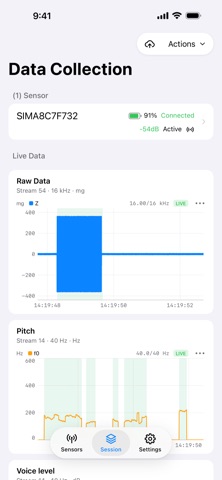
QHub records and plots data from Bluetooth LE sensors that implement the QSS service profile. Connect a sensor, send its commands, watch its data streams on live plots, mark events, and keep every recording on your device as session folders with CSV files you can open in the Files app.
• Configs describe each sensor's commands and data streams • Recording continues while the app is in the background • Sign in with a username and password to upload recordings to the QHub server • Works offline; recordings never depend on a network connection
A sensor that implements the QSS service profile is required. Settings → Bluetooth → Simulated sensors lets you try the app without one.
People rate it
Sign in to rate this app. Honest is what counts.
No ratings yet. Tried it? Be the first to rate it.
More Utilities apps
Best new Utilities apps this week Drainly: Speaker CleanerMuffled speaker after a splash, rain, or a sweaty workout?
 Photo & PDF Resize: KBFile too large to upload?
 Arvectum Proxy LauncherArvectum Proxy Launcher is a network utility that routes your iPhone through a proxy you…
 Vodoalarm: vodostaji BiHVodoalarm javlja kad tvoja rijeka naglo raste, pa ne moraš stalno gledati vodostaje
 Dusty: Photo Cleaner PetYour camera roll's new pet
 FairAuth: AuthenticatorFairAuth creates the codes for two-step verification on iPhone and iPad