
QRemote for Quarto
Not claimedQRemote turns your iPhone and Apple Watch into a remote for presentations made with…
By Pascal Burkhard · ProductivityWhy we expect it: The thorough description and clear value make this a promising companion for Quarto presenters.


About
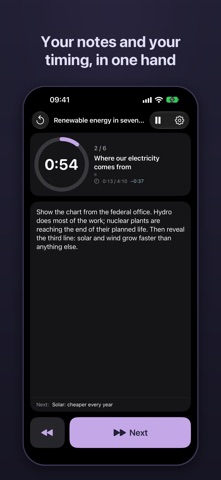
QRemote turns your iPhone and Apple Watch into a remote for presentations made with Quarto and reveal.js, with your timing and your speaker notes always at hand.
ON YOUR APPLE WATCH • Double tap to go to the next slide (Apple Watch Series 9, Ultra 2 and later), or tap Next • A countdown for each slide, with the slide's title and its steps • A light buzz a few seconds before the end, two strong buzzes when the time is up • Keeps counting with your wrist down, for talks of up to an hour
ON YOUR IPHONE • Your speaker notes, large and easy to read • The countdown, the next slide's title, and whether you are ahead of or behind schedule • Back and Next within reach of your thumb; pause and reset • The screen stays on while you present
TIME EVERY SLIDE, OR ONLY SOME Give a slide 45 seconds or 1:30 in your Quarto file. Slides without a time simply show how long you have spent on them. Made for pitches, PechaKucha, lessons and conference talks.
NO SETUP Open QRemote Relay in your Mac's menu bar: your iPhone finds the Mac on its own, and your Apple Watch uses the iPhone's settings. Works on any local network, or with the Mac on your iPhone's Personal Hotspot. An optional PIN keeps others on the network from driving your slides.
WHAT YOU NEED • A presentation made with Quarto (quarto.org) and the free qremote extension: quarto add Nenuial/quarto-qremote • QRemote Relay, on the Mac that shows the presentation (Mac App Store) • An iPhone with iOS 18 or later; an Apple Watch with watchOS 11 or later is optional
QRemote collects no data. Everything stays on your local network.
People rate it
Sign in to rate this app. Honest is what counts.
No ratings yet. Tried it? Be the first to rate it.