
Qrisp: QR Code Generator
Not claimedMake QR codes that never expire
By 辉 任 · UtilitiesWhy we expect it: A clear, carefully written listing with a strong privacy angle and genuinely free core features makes the value easy to grasp.



In short
Qrisp: QR Code Generator makes QR codes for links, social profiles, Wi-Fi, contact cards, events, locations and plain text, with no account or subscription needed. It is aimed at people who need printed or shared codes for shops, events or homes. One notable point is that codes store their data directly rather than through a server, so they keep working even if the app is deleted.
Summary by Debuts, based on the App Store listing.About
Make QR codes that never expire.
Qrisp puts your link, Wi-Fi password or contact card straight into the code. Nothing is routed through anyone's server, so your code keeps working for good, whether or not you ever pay, and even if you delete the app.
NO SUBSCRIPTION. NO ACCOUNT. NO ADS. Everything you need to make a working code is free: every kind of code, colours, high-resolution images and print templates. No limits and no watermark.
TEN KINDS OF CODE • Link: websites, menus, anything online • Social: Instagram, TikTok, YouTube, WhatsApp and more • Wi-Fi: guests join without typing a password • Contact: your card, saved in one scan • Event: goes straight into their calendar • Location: opens in Apple Maps or Google Maps • Text, Email, SMS and Phone
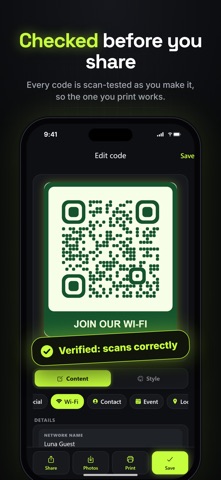
CHECKED BEFORE YOU SHARE Qrisp reads every code back as you design it. You see "Verified: scans correctly" before you print a single copy, and a warning if a colour or logo would make it hard to scan.
MAKE IT YOURS Colour themes, dots, rounded corners, a frame with a caption such as "SCAN ME" or "JOIN OUR WI-FI", and your logo in the middle. Try any style on your own code before you decide.
PRINT-READY IN SECONDS Free templates for posters, Wi-Fi signs, menus, review cards, photo-sharing signs, business cards and label sheets, in Letter or A4. Print from your iPhone or iPad, or save a PDF.
CHECK A CODE BEFORE YOU OPEN IT Scan any QR code and see what it holds before anything opens. Qrisp warns you when a link hides its destination behind a redirect service, and shows where it really goes when you ask.
STRAIGHT FROM THE SHARE SHEET In Safari or any app, tap Share and choose Qrisp. The link or text you shared becomes a QR code right there, ready to copy or save to Photos.
QRISP PRO: ONE PURCHASE, YOURS FOR GOOD • Your logo in the middle of the code • Gradient colour themes • Dot and corner shapes • Frames with a caption • Vector SVG export, sharp at any size • Batch codes: paste a list or import a CSV, then print label sheets or save a ZIP of SVGs No subscription, ever.
PRIVATE BY DESIGN No account, no tracking, no analytics. Your codes stay on your device, and the scanner keeps no history.
People rate it
Sign in to rate this app. Honest is what counts.
No ratings yet. Tried it? Be the first to rate it.
More Utilities apps
Best new Utilities apps this week Vodoalarm: vodostaji BiHVodoalarm javlja kad tvoja rijeka naglo raste, pa ne moraš stalno gledati vodostaje
 NadhirNadhir is an independent app
 Rokey: Romanian KeyboardType Romanian without worrying about diacritics
 Vibe Island: AI Agent MonitorVibe Island is a command center for the AI coding agents running on your Mac
 Private AuthenticatorPrivate Authenticator keeps your two-factor authentication codes on your own Apple…
 Photo Clean: Photo CleanupA crowded camera roll?