
Readback: METAR & TAF Decoder
Not claimedPaste the report
By Yaniv van der Stigchel · Utilities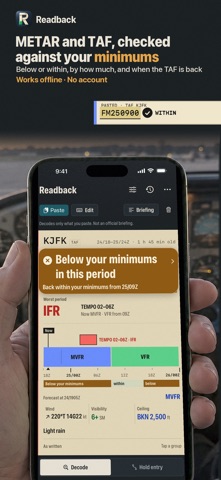


About
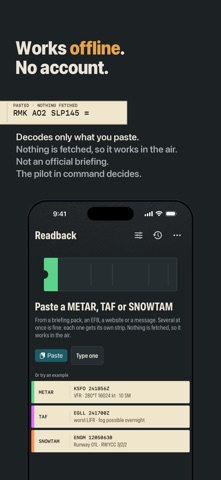
Paste the report. Read it back in plain words.
Readback decodes the METAR, SPECI, TAF and SNOWTAM text you already have — from a briefing pack, an EFB, a website or a message. Paste one report or a whole briefing; each becomes its own strip, with the flight category up front and every group explained.
TAP A GROUP, SEE WHAT IT MEANS
Tap any group in the raw report — BKN025, R24/P1500, TEMPO 2502/2506 — and its meaning appears right under it, while the matching line lights up in the decode. Tap a decoded line and its groups light up in the raw text. A group the decoder does not know is flagged in amber and shown exactly as written. Nothing is quietly dropped.
THE FLIGHT CATEGORY, AND WHY
VFR, MVFR, IFR or LIFR on every METAR, using the FAA definitions, with the element that set it: "on the ceiling" or "on the visibility". Wind, visibility, ceiling, temperature and dew point, altimeter and humidity as tiles, each coloured by its own category.
THE TAF AS A TIMELINE
The forecast laid out in time: FM and BECMG on one lane, TEMPO and PROB above it, every period coloured by category, with a now-marker. Drag along it to read the forecast at any hour; the raw group that produced it lights up. The strip's badge shows the worst period, TEMPO included.
SNOWTAM, THE GLOBAL REPORTING FORMAT
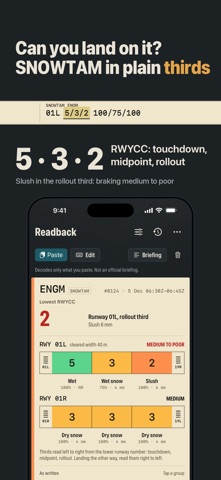
The GRF SNOWTAM drawn as the runway in thirds: the runway condition code of each third on the RCAM colour scale, the contaminant, coverage and depth under it, the braking term for the lowest code, the cleared width, and the situational-awareness section — snowbanks, chemical treatment, taxiway and apron conditions — decoded line by line.
HOLDING ENTRY, DRAWN
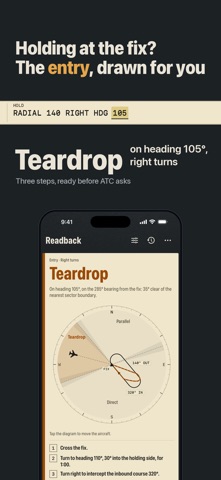
Inbound course or VOR radial, right or left turns, and your heading: the diagram shows the three entry sectors around the fix, the ±5° zones where either entry is acceptable, your aircraft on the ring and the entry flown. Direct, parallel or teardrop, with the headings and turns spelled out, the leg time and the FAA or ICAO holding speed, and the clearance read back in words. Drag the aircraft to try another heading.
People rate it
Sign in to rate this app. Honest is what counts.
No ratings yet. Tried it? Be the first to rate it.
More Utilities apps
Best new Utilities apps this week Drainly: Speaker CleanerMuffled speaker after a splash, rain, or a sweaty workout?
 Photo & PDF Resize: KBFile too large to upload?
 Arvectum Proxy LauncherArvectum Proxy Launcher is a network utility that routes your iPhone through a proxy you…
 Vodoalarm: vodostaji BiHVodoalarm javlja kad tvoja rijeka naglo raste, pa ne moraš stalno gledati vodostaje
 FairAuth: AuthenticatorFairAuth creates the codes for two-step verification on iPhone and iPad
 Polarglow: Aurora AlertsKnow tonight's chance of seeing the aurora where you are, and never miss a storm night