
Readglide: Speech Practice
Not claimedRehearse a speech, a presentation or an interview answer with the script in front of…
By Kohei Omori · Productivity




About
Rehearse a speech, a presentation or an interview answer with the script in front of you, then find out how closely you kept to it. Readglide scrolls your script, records the take and scores it against the text, all on the iPhone or iPad in your hands.
SCORED AGAINST YOUR SCRIPT • Read as written: how closely the part you read matched the script, word for word, and how many of its lines you covered • Skipped lines are listed, so you know what to look at before the next take • Speaking rate in words (or characters) per minute, and each pause of two seconds or longer with the words you resumed on • A practice history for each script: a chart of recent takes, the change since the last take, and your personal best • Set a time budget to compare planned and actual time for each section (start a line with # to make a section)
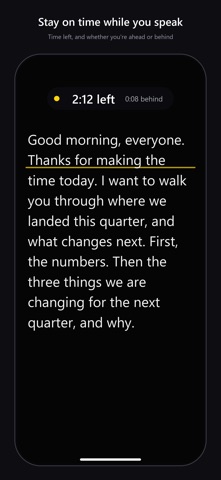
ON THE CLOCK WHILE YOU SPEAK • Give a script a time budget and watch a green, yellow or red signal, the time left, and whether the scroll is ahead of or behind plan • A marker in the script shows where the scroll should be by now • Fit to time: one tap sets the scroll speed so the rest of the script finishes close to your time
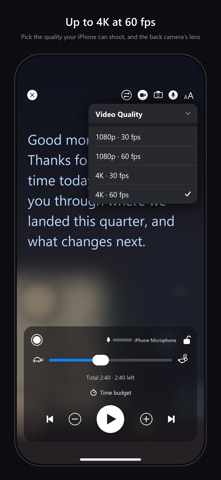
REHEARSE YOUR WAY • Audio only: practice with the microphone alone — no camera, and the recording is not saved to Photos • On camera: the script floats over the live preview and is not recorded into the video, at up to 4K and 60 fps depending on the model • Script captions: save a video take with captions made from your script text, in its original aspect ratio or 9:16, or share an .srt file
SELF-TAPES AND SCENES • Write character names in capitals ("ANNA: …") and pick your role from a menu; your partner's lines dim • Hear your partner's lines read aloud by the system voice — the scroll waits until each line is finished • Put a slate card with your name, role and agency at the start of a captioned video
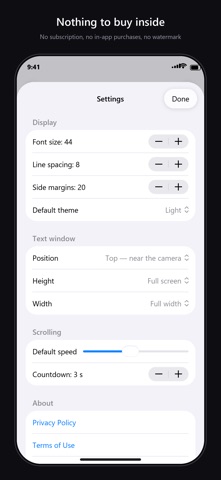
THE PROMPTER • Smooth auto-scroll with fine speed control, adjustable while it runs, and the reading time at the current speed • Jump between sections, pause with a tap, and start from a countdown • Font size, typeface, line spacing, margins and five color themes • Mirror mode for beam-splitter rigs, and vertical text for Japanese scripts • Import PDF, text and RTF files, and keep as many scripts as you like • Bluetooth remote and foot-switch control
ON-DEVICE SPEECH RECOGNITION Readglide turns your take into text on the iPhone or iPad itself and compares it with the script without uploading the audio. Scoring and captions work for scripts in languages the iPhone or iPad can recognize offline; for a language it cannot, the app tells you instead. Only the numbers from each score are kept, script by script.
Readglide costs a single up-front price, and everything described here comes with it — no monthly fee.
People rate it
Sign in to rate this app. Honest is what counts.
No ratings yet. Tried it? Be the first to rate it.