
Rehale: Haptic Breathing Guide
Not claimedClose your eyes
By PawPaw · Health and fitnessWhy we expect it: Distinct haptic breathing cues and thoughtful Apple Watch features give this eyes-free wellness app a strong, memorable debut.


About
Close your eyes. Follow the vibration. Slowly.
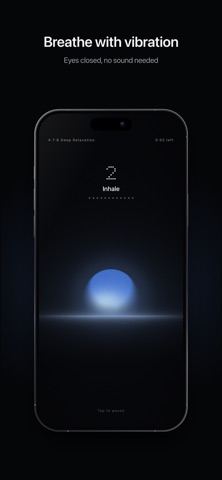
Rehale guides your breathing with vibration. Inhale, hold and exhale each feel different, so you know where you are in every breath without looking at the screen or turning on sound.
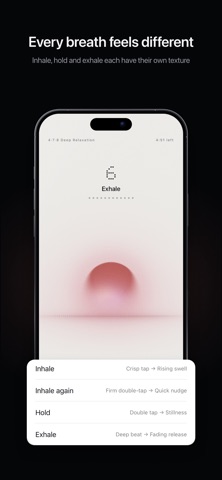
■ A different vibration for each breath Inhale: a clear tap, then a rising vibration. Hold: a double tap, then stillness. Exhale: a deep thud, then a vibration that fades away. Each vibration lasts as long as the breath itself. Choose Soft, Medium or Firm, and feel each one in Settings before you begin.
■ A screen that glows with your breath A sun rises over a dotted horizon as you breathe in, and sinks as you breathe out. It turns ocean blue as you inhale, silver as you hold and sunset orange as you exhale.
■ Six breathing patterns · Physiological Sigh (3·1·6) · Resonant Breathing (5.5·5.5) · Box Breathing (4·4·4·4) · Deep Relaxation (4·7·8) · Calm Breathing (4·6) · Triangle Breathing (4·4·4) Sessions run from 1 to 20 minutes.
■ How Are You Now? Tap the sparkle button on the Home screen, pick how you feel, and Rehale suggests a breath and a length. On devices with Apple Intelligence turned on, you can also type it in your own words. Suggestions are made on your device.
■ Apple Watch on its own Start right from Apple Watch, no iPhone needed. The vibration keeps going when you lower your wrist, so you can close your eyes and simply breathe along. Add the Quick Breathe complication to your watch face to start your last pattern with one tap. With Rehale Pro, Find My Pace on Apple Watch spends about five minutes at five paces to find the one your heart rate follows most closely, and saves it as a pattern.
■ Breath Sync Rest your iPhone on your belly, or lay the hand wearing your Apple Watch there, and breathe along. You can also press the screen during a session: press again as each breath begins, hold it through that breath, and lift it during holds. When your breathing comes through clearly enough, Rehale shows your Breath Sync after the session: how closely you followed the guided rhythm. The score is free. The breath-by-breath Sync Breakdown is part of Rehale Pro.
■ Your everyday breathing In the Measure tab, Rehale observes one minute of Free Breathing, with no guide. Lie down in the same position and take one big breath in to begin. Or press the screen for 30 seconds: press as you breathe in, lift as you breathe out. You'll see your breaths per minute, inhale-to-exhale ratio and regularity. Reviewing past measurements and comparing them with earlier ones is part of Rehale Pro.
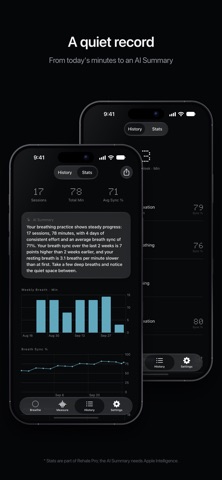
■ A quiet record Your sessions are kept in History, along with today's minutes, your streak and this week's total. Finished sessions are also saved to Apple Health as Mindful Minutes. You can turn this off in Settings. Stats in Rehale Pro show your weekly rhythm, results by pattern and your breathing pace, with an AI Summary on devices with Apple Intelligence.
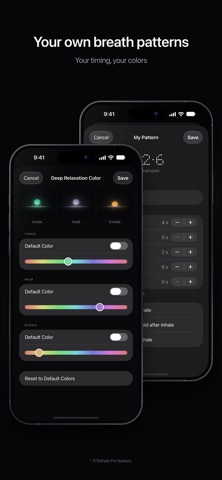
■ Free to start Haptic guidance, all six patterns, Apple Watch, Breath Sync, Free Breathing measurement, your session history and How Are You Now? suggestions are all free. Rehale Pro is a one-time purchase that's yours for good, with Family Sharing. It adds: · Custom breath patterns · Your own colors for inhale, hold and exhale · Past measurements and comparison with earlier ones · In-depth Breath Sync analysis · Find My Pace on Apple Watch · Full stats, AI Summary and CSV export
■ Your history, on your devices and iCloud No account, no sign-up. Your history and settings live on your iPhone, your Apple Watch and your own iCloud, so they carry over when you reinstall or switch iPhones. You can turn the iCloud backup off in Settings, and your history is never sent to our servers.
People rate it
Sign in to rate this app. Honest is what counts.
No ratings yet. Tried it? Be the first to rate it.