
Repose: AI Interior Design
Not claimedRedesign your own room from a photo
By Lucent Enterprises Ltd. · LifestyleWhy we expect it: Clear value from a photo of your own room, with a detailed description, eight screenshots and a broad interior design audience.




In short
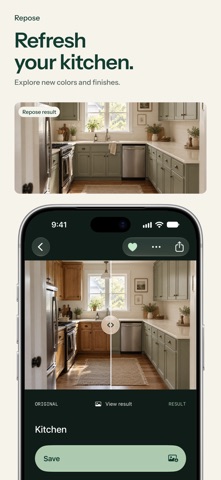
Repose: AI Interior Design redesigns a photo of your living room, bedroom or kitchen in styles such as Japandi, Scandinavian or Coastal, with colours and furniture you choose. It suits people who want to test interior ideas before changing a room. It stands out for its before-and-after slider and option to refine one detail at a time.
Summary by Debuts, based on the App Store listing.About
Redesign your own room from a photo. Choose a style and see your living room, bedroom or kitchen with new furniture, colours and decor, then refine it one detail at a time.
WHAT YOU CAN DO • Redesign my room: try styles like Japandi, Scandinavian, Mid-century and Coastal, with the colour palette you choose. • Rearrange furniture to see your room in a new layout. • Remove clutter, or use Clean slate to see the room empty. • Replace an object, try a paint colour or change the flooring by selecting it in your photo. • Custom edit: select an area and describe the change you want. • Match a look from an inspiration photo, or browse Discover for ideas. • Refresh your home's exterior or imagine a new garden.
FOR EVERY ROOM Living rooms, bedrooms, kitchens, dining rooms, bathrooms, home offices, kids' rooms, studio flats, hallways and balconies, plus gardens and home exteriors.
KEEP REFINING Compare the original and the result with the before-and-after slider. Keep editing any result: clear the room, try a new style, then change a single detail. Save designs in My spaces and share your favourites.
MADE FOR YOUR OWN SPACE Take a photo, choose one from your library, or start with an example. Available on iPhone and iPad. No account sign-up is required.
DESIGNS AND SUBSCRIPTIONS Start with a limited number of free designs. Each completed generation, including a new edit, uses one design. Saving, sharing and comparing existing results are free. The optional weekly subscription includes 50 designs per paid week. Unused weekly designs do not roll over. Eligible customers may receive a free trial; its terms and your local price are shown before purchase. An active trial or paid subscription is required to buy extra design packs. Purchased pack designs do not expire.
Payment is charged to your Apple Account. Subscriptions renew automatically unless cancelled at least 24 hours before the current period ends. Manage or cancel your subscription in your Apple Account settings.
ABOUT AI RESULTS Repose creates visual ideas, not measured plans. AI can change details and proportions. Check dimensions and material samples before making changes to your home. Creating a design requires an internet connection and sends the selected photos and instructions to an AI service.
Privacy policy: https://reposedesign.com/privacy/ Terms of use: https://reposedesign.com/terms/ Apple standard EULA: https://www.apple.com/legal/internet-services/itunes/dev/stdeula/
People rate it
Sign in to rate this app. Honest is what counts.
No ratings yet. Tried it? Be the first to rate it.
More Lifestyle apps
Best new Lifestyle apps this week askoraAI 회상 노트
 Familjekalender – familjens årFamiljekalender är en delad kalender för hela familjen, där varje dag kan bära ett foto…
 My Anime TrackerAnime watch order, no guesswork.
 Sakinah: Quran, Adhkar & DuaSakinah brings the Qur'an, the prayer and daily remembrance together in one calm app, in…
 Mizwala: Prayer Times & QiblaMizwala is a calm, focused companion for the five daily prayers
 Starhush: Calm ConstellationsSpend five quiet minutes before sleep connecting the stars of the night sky, one by one…