
Roost Relay
Not claimedRoost is a menu bar app that gives every AI app on your Mac one local address and…
By Tair Mukhanov · Utilities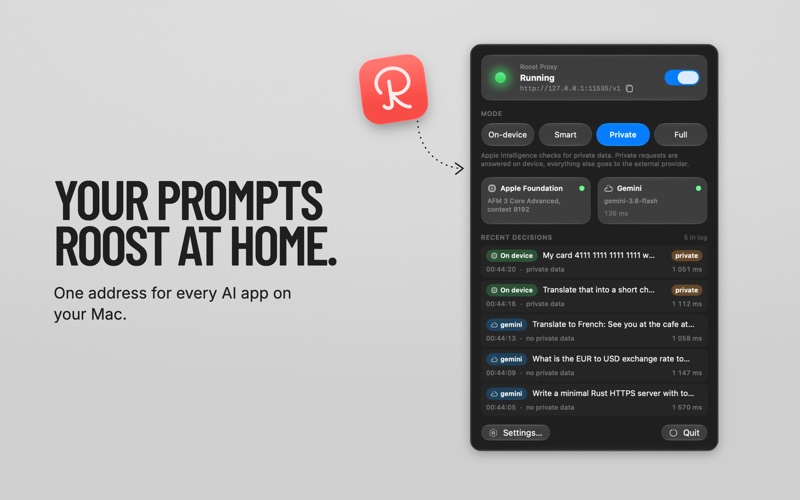


In short
Roost Relay is a macOS menu bar app that gives every AI app on your Mac one local address and routes each request either to Apple Intelligence on the device or to a provider you choose. It suits people who use several AI tools and want private data kept on their Mac. A standout detail is that every response includes headers showing where the request went and why.
Summary by Debuts, based on the App Store listing.About
Roost is a menu bar app that gives every AI app on your Mac one local address and decides, request by request, whether Apple Intelligence answers on your Mac or the request goes to the cloud provider you chose. The decision is made on your Mac, so private data stays there unless you say otherwise.
ONE ADDRESS FOR ALL YOUR AI APPS Point any app that speaks the OpenAI Chat Completions API at http://127.0.0.1:11535/v1 and use any API key. Your real keys stay in the macOS Keychain. Chat clients, editor plugins, agents and scripts all go through the same door.
FOUR MODES, ONE CLICK • On-device: everything is answered by Apple Intelligence on your Mac. Works offline. • Smart: Apple Intelligence reads each request first. Private data and simple tasks stay on your Mac; code, deep analysis and questions that need today's information go to your provider. • Private: only the privacy check. Private conversations stay on your Mac, everything else goes to your provider at full strength. • Full: everything goes to your provider, no checks.
PRIVACY BY DECISION In Smart and Private modes the on-device model looks at the whole conversation and flags passwords, API keys, card and account numbers, names with contact details, medical and financial information. Flagged conversations are answered on your Mac; the provider never sees them. If the assessment times out or your provider is down, the request stays on your Mac.
BRING YOUR OWN PROVIDER Presets for llama.cpp, Ollama, DeepSeek, OpenAI, Gemini and Claude; any other OpenAI-compatible server takes a base URL and a key. Requests are forwarded exactly as your app sent them, so tools, JSON mode and streaming options pass through, and the provider's response comes back untouched.
SEE EVERY DECISION The panel shows the last five requests: where each one went, why, how long it took, and a badge when private data was involved. Every response also carries X-Roost headers with the destination, the reason and the model, so scripts can audit what left the machine.
MADE FOR THE MENU BAR Status light, server address with a copy button, start/stop switch, a mode switch and two cards for Apple Intelligence and your provider. Settings cover port and interface, launch at login, providers with a connection test, routing options and a full decision log.
NO ACCOUNTS, NO ANALYTICS Roost has no sign-up, no telemetry and no analytics. It talks to exactly two things: the on-device model and the providers you configured.
REQUIREMENTS macOS 27 or later on a Mac with Apple Silicon, with Apple Intelligence turned on in System Settings. Smart, Private and Full modes need access to at least one provider: a cloud account with an API key, or a server on your network. Cloud providers bill you directly; Roost adds nothing.
Apple Intelligence's on-device model is small: great for quick tasks, weaker at long or specialized ones. Use Private mode to send everything that is not private to a larger model.
People rate it
Sign in to rate this app. Honest is what counts.
No ratings yet. Tried it? Be the first to rate it.
More Utilities apps
Best new Utilities apps this week Vodoalarm: vodostaji BiHVodoalarm javlja kad tvoja rijeka naglo raste, pa ne moraš stalno gledati vodostaje
 Letter Explainer: PostklarGot an official letter and only understand half of it?
 NadhirNadhir is an independent app
 Rokey: Romanian KeyboardType Romanian without worrying about diacritics
 Vibe Island: AI Agent MonitorVibe Island is a command center for the AI coding agents running on your Mac
 Private AuthenticatorPrivate Authenticator keeps your two-factor authentication codes on your own Apple…