
Scanner OS – Docs & Receipts
Not claimedScan like a flatbed scanner – right on your iPhone
By Julian Paul Bermeiser · ProductivityWhy we expect it: Clear value and a privacy-first design with no account or subscription make this scanner stand out.





About
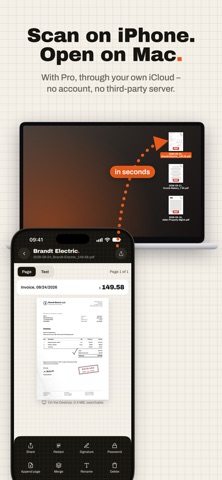
Scan like a flatbed scanner – right on your iPhone. Lay the page down, hold your iPhone over it: Scanner finds the page, captures it on its own and turns it into a clean PDF. No account, no third-party cloud, no subscription.
ON YOUR MAC SECONDS LATER With Pro, every scan lands on your Mac's Desktop automatically – through your own iCloud, with no third-party server. Pick the Desktop folder once, done. Scan on your iPhone, keep working on your Mac. (On the Mac, “Desktop & Documents Folders” must be turned on in iCloud Drive.)
LIKE A FLATBED SCANNER • Finds the page and captures as soon as you hold still; flash auto, on or off • Straightens pages shot at an angle and turns them upright • Evens out shadows and light: white paper, crisp text, stamps and signatures keep their color • Removes punch holes as well as fingers and bits of table at the border • Pages with large photos, such as flyers, are only gently brightened • Filters: Scan, Grayscale, Black & White, Original
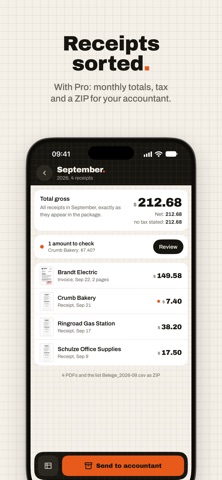
RECEIPTS UNDER CONTROL (PRO) • Amount, date, sender and VAT are recognized • Monthly totals at a glance, uncertain amounts are flagged • Monthly package for your accountant: all receipts as PDFs plus a list (CSV) in one ZIP
FIND INSTEAD OF SEARCH (PRO) • Searchable PDFs with a text layer • Search finds every word in all your scans • Automatic file names from date, sender and amount, in the order you like
EVERYTHING A SCAN NEEDS • Multiple pages, reorder, rotate, crop with a magnifier • Share the PDF, rename, merge scans, add pages • Import images from Photos or Files • With Pro: redact, sign (black or blue), password, ID cards with front and back on one page • Shortcuts “Scan” and “Scan receipt” for Siri, from iOS 18 also as a Control Center button • Dark Mode, English and German, VoiceOver
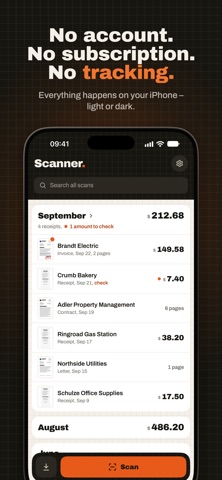
YOUR DATA STAYS WITH YOU Everything happens on your iPhone: page detection, text recognition, receipt recognition, PDF. No account, no ads, no tracking. App Store privacy label: Data Not Collected.
FREE AND PRO Free: unlimited scanning and importing, the full scan look, all filters, create and share PDFs. Pro: buy once, keep forever. No subscription. With Family Sharing for your whole family.
People rate it
Sign in to rate this app. Honest is what counts.
No ratings yet. Tried it? Be the first to rate it.