
SendReady: PDF Redact & Check
Not claimedGot a PDF you need to send, but it contains something the other person shouldn't see?
By SUJEETH MAHESVARAMOORTHY · ProductivityWhy we expect it: Its honest, on-device redaction rebuilds pages as images and verifies the exported copy before sharing.



In short
SendReady: PDF Redact & Check is a productivity app for iPhone and iPad that lets you edit a PDF with text boxes, highlights, a drawn signature image, and manual or find-based redaction. Redacted pages are rebuilt as images with the covered areas filled black, and the app checks the exported copy before you share it. Documents are processed on the device with no uploads or accounts, and it cannot read text inside scanned pages or open password-protected PDFs.
Summary by Debuts, based on the App Store listing.About
Got a PDF you need to send, but it contains something the other person shouldn't see? SendReady helps you make a quick, careful edit on your iPhone or iPad and then checks the copy you're about to share.
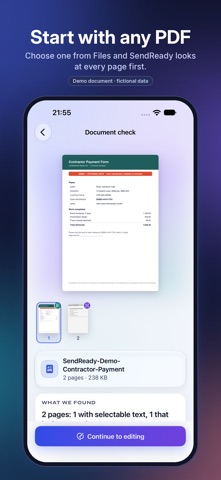
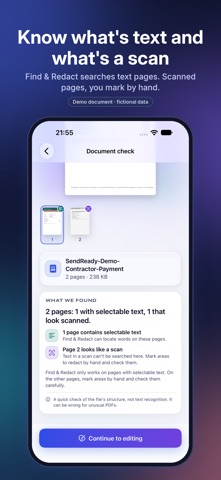
CHECK THE DOCUMENT FIRST SendReady looks at each page and tells you which ones have selectable text and which look like scanned images, so you know what search can and can't find.
EDIT • Add a text box • Highlight an area • Place a drawn signature (a picture of your signature, not a certified digital signature) • Mark areas to redact by hand, or use Find & Redact to mark every match of a word or number
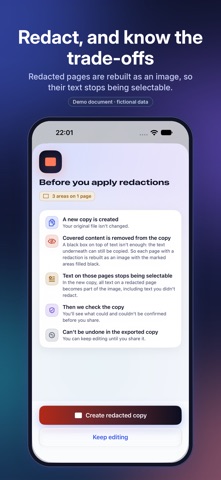
REDACT BY REBUILDING THE PAGE A black box on top of text isn't a redaction: the text underneath can still be copied. SendReady rebuilds every page that has a redaction as an image with the marked areas filled black, so the covered content isn't in the new file. Text on those pages is no longer selectable.
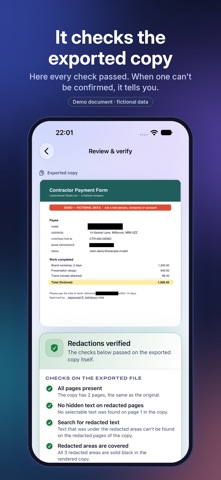
CHECK THE EXPORTED COPY Before you share, SendReady checks the new file itself: • no selectable text remains on redacted pages • the text you covered can't be found by search • every redacted area is solid black when rendered • the rebuilt pages still line up with the original If a check can't be completed, SendReady tells you to review the file yourself instead of claiming success.
PRIVATE BY DESIGN • Documents are processed on your device. No uploads, no accounts, no ads, no analytics. • Your original file is never changed. You always get a new copy. • Optionally leave out the title, author and other document details.
FREE TO TRY Finish one document a week for free, or try the built-in sample at any time. A one-time in-app purchase unlocks unlimited use. No subscription.
Please note: SendReady can't read text inside scanned images, so check those pages yourself. It doesn't make files untraceable and doesn't remove every kind of hidden history. Password-protected PDFs aren't supported in this version.
People rate it
Sign in to rate this app. Honest is what counts.
No ratings yet. Tried it? Be the first to rate it.
More Productivity apps
Best new Productivity apps this week ChickMark: Habit TrackerChickMark is a simple habit tracker for routines, goals, and reminders
 Dayflint: One Thing a DayToo many priorities?
 Fristo CAFMFristo is the app for Fristo CAFM, the facility management software
- BeginAnywayMorning alarm for hard tasks: set one task, prove you started, build a streak
 DHUDEDHUDE Analityxs es la herramienta de gestión diaria para grupos de restauración y ocio…
 ScrollTime: Limit & ChallengesTikTok, Instagram, Facebook… ScrollTime helps you take back control of the time you…