
Shift Calendar: Hours & Widget
Not claimedSee your whole shift schedule on one calendar, and know at a glance when you work and…
By Deokhyeon Kim · ProductivityWhy we expect it: A focused, well-described shift calendar with clear value for rotating-shift workers, offering fill patterns, reminders, a widget and private iCloud backup.



About
See your whole shift schedule on one calendar, and know at a glance when you work and when your next day off is.
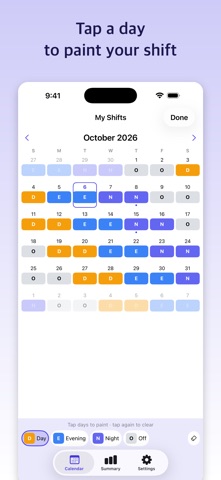
Create your shift types – Day, Evening, Night and Off to start with – and tap days to paint them in. Fill a repeating rotation for months at a time, and set a reminder before a shift starts.
■ Made for - Nurses and hospital staff on rotating shifts - Shift workers in factories, services, police and fire departments - Anyone who copies a roster into a calendar by hand every month
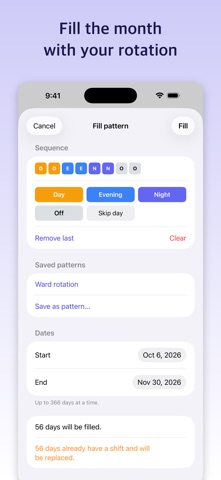
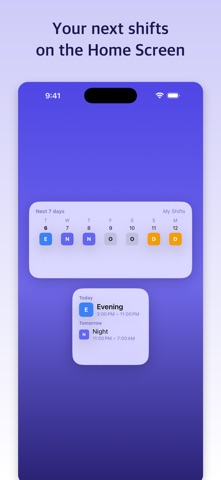
■ Features - Paint: pick a shift type and tap days; tap again to clear. There's an eraser too - Fill pattern: tap shift types in order to build a rotation, add "Skip day" for days left empty, and fill up to 366 days at a time from any start date. Save the patterns you use often - Shift types with a name, a 2-character short label, a color and set hours – including night shifts that end the next day - A reminder for each shift type with set hours: at start time, or 15 minutes, 30 minutes, 1 hour, 90 minutes or 2 hours before - A note for any day - Summary for any month: shifts by type, total hours and your next day off - Home Screen widget: the next 7 days, starting today - iCloud backup: automatic while you're signed in to iCloud; restore on a new device Reminders and the widget follow your first calendar. Reminders are scheduled on your device, so open the app now and then to keep the later ones scheduled.
■ Privacy Your shifts are stored on your device and never sent to our servers. While you're signed in to iCloud, a backup copy is kept in your own iCloud. No account needed. Where ad consent applies, you can change your choice under Ad privacy options in Settings.
■ Pricing Free with ads and one calendar. Pro removes ads and unlocks multiple calendars (for family, colleagues or a second job) and exporting your month as an image. Get Pro with a monthly or yearly subscription, or with a one-time lifetime purchase. Subscriptions renew automatically unless canceled at least 24 hours before the end of the current period. Payment is charged to your Apple Account; manage or cancel your subscription in Settings.
Terms of Use (EULA): https://www.apple.com/legal/internet-services/itunes/dev/stdeula/ Privacy Policy: https://donald-deok.github.io/app-privacy/shift_calendar_ios.html
People rate it
Sign in to rate this app. Honest is what counts.
No ratings yet. Tried it? Be the first to rate it.