
Shift Pro: Hours & Timesheet
Not claimedShift Pro is the shift calendar and hours tracker for people who get paid by the hour…
By AISSA AISSAOUI* · Productivity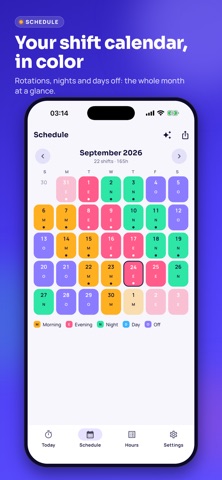



In short
Shift Pro: Hours & Timesheet is a shift calendar and hours tracker for hourly workers such as nurses, warehouse staff, and drivers. Users clock in and out, see overtime and an estimated pay per period, and export a timesheet PDF or CSV. Data stays on the phone, with no account or sign-up required.
Summary by Debuts, based on the App Store listing.About
Shift Pro is the shift calendar and hours tracker for people who get paid by the hour: nurses, factory and warehouse workers, security guards, servers, drivers, retail staff, temp workers.
Put your shifts on the calendar, clock in and out, and Shift Pro tells you how many hours you worked, how much overtime you did and what your paycheck should look like — before it arrives.
YOUR SHIFT CALENDAR, IN COLOR • Morning, evening, night, day, off: each shift type has its own color and abbreviation, so a whole month reads at a glance. • Rotation patterns in one tap: 3 on / 2 off, 4×10, 2-2-3, Pitman, DuPont or any cycle you build yourself. • Change any single day afterwards, add notes, plan several jobs on the same calendar. • Export your schedule to the Calendar app, Google Calendar or Outlook (.ics), and share it with your family.
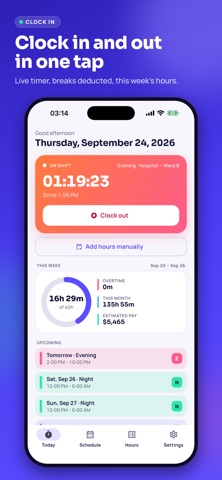
CLOCK IN, CLOCK OUT • One tap to start your shift, one tap to end it. Breaks are deducted automatically. • Manual entries for the days you forgot, with a shift type that pre-fills the times. • Night shifts just work: enter 10:00 PM to 6:00 AM and Shift Pro understands the shift ends the next day.
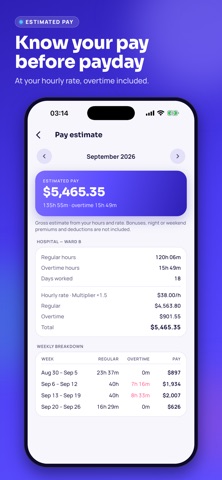
OVERTIME AND ESTIMATED PAY • Weekly threshold (40 h by default) and optional daily threshold, with your own multiplier (1.5× by default). • Choose whether your week starts on Monday or Sunday — it changes the overtime count. • Several jobs at different hourly rates, each with its own rules. • A pay estimate per period so you can check your pay stub line by line.
TIMESHEET READY TO SEND • Timesheet PDF with your hours, breaks, overtime and totals, laid out to hand to your employer. • CSV export for a spreadsheet, free and unlimited. • Full backup file to move to a new phone without losing anything.
REMINDERS • A notification before each shift, at the time you choose.
PRIVATE BY DESIGN • No account, no e-mail address, no sign-up. • Your hours, rates and shifts stay on your phone. Nothing is sent to a server.
FREE AND PRO The calendar, clocking, manual entries, rotations, CSV export and backup are free and unlimited. The free version shows ads and includes one free timesheet PDF per period, with more available by watching a short video.
Shift Pro Pro removes all ads and unlocks unlimited timesheet PDFs and the detailed pay breakdown. Choose a monthly or yearly subscription, or a one-time lifetime purchase. Subscriptions renew automatically unless cancelled at least 24 hours before the end of the current period, and can be managed in your App Store account settings.
Amounts shown are estimates based on what you enter; always check your pay stub with your employer.
Terms of Use: https://shiftpro.prohabitatdeals.com/terms-en.html Privacy Policy: https://shiftpro.prohabitatdeals.com/privacy-en.html
People rate it
Sign in to rate this app. Honest is what counts.
No ratings yet. Tried it? Be the first to rate it.
More Productivity apps
Best new Productivity apps this week ChickMark: Habit TrackerChickMark is a simple habit tracker for routines, goals, and reminders
 Dayflint: One Thing a DayToo many priorities?
 Snappy Do ItSix connected modes. One traceable journey.
 Fristo CAFMFristo is the app for Fristo CAFM, the facility management software
 UhWhat? Voice NotesCatch the thought before it disappears
- BeginAnywayMorning alarm for hard tasks: set one task, prove you started, build a streak