
Sidetone: Morse Code Trainer
Not claimedSidetone is a Morse code trainer built for the Mac and built around your key
By Lukasz Zielinski · EducationWhy we expect it: The careful description and thoughtful training design make this a promising, well-focused Morse trainer for Mac users.




In short
Sidetone: Morse Code Trainer is a Mac app for learning and practicing Morse code, with receive, send, echo and written drills. It is aimed at people learning CW who want to train with their own key or a vBand adapter. One notable feature is Mastery mode, which has no fixed session length and unlocks the next character without a percentage requirement.
Summary by Debuts, based on the App Store listing.About
Sidetone is a Morse code trainer built for the Mac and built around your key.
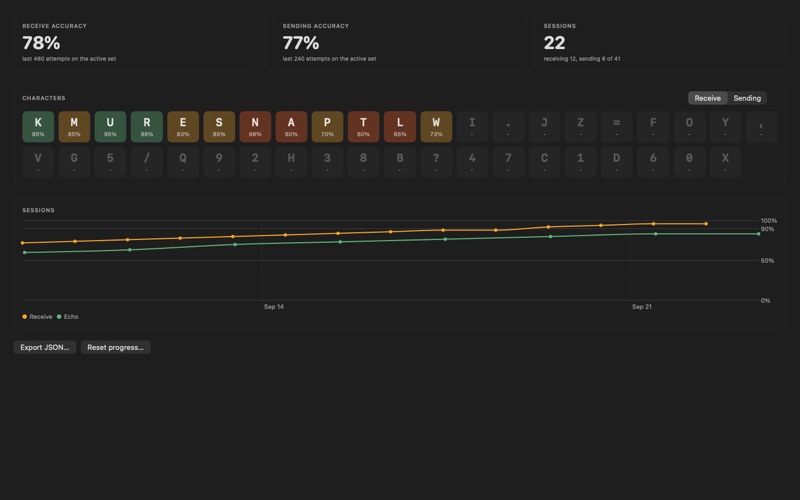
RECEIVE Learn characters in the Koch order, two at a time, with Farnsworth spacing so characters sound fast while the pace stays comfortable. Train on random groups, single characters, common words, CW abbreviations and realistic callsigns. Every character keeps its own accuracy, weaker characters come up more often, and the app tells you when a Groups or Single session is above 90% and you are ready for the next character. Click the Koch strip to train up to any character.
NEW CHARACTER CARD When a character unlocks, it opens as a card: the letter, its dot-dash pattern large on screen, one play. Start a warm-up and the new character is mixed with the two before it until it scores the Mastery target, with nothing recorded to your statistics. Skip the card if you already know the character, or Option-click any character on the Koch strip to review it later.
MASTERY No fixed length. Every character in your set has to score a target number of hits (2 to 5), a miss takes one away, and the missed character comes back within the next two. Finishing a Mastery session unlocks the next character with no percentage gate. For a challenge, set a miss limit of 3 or 5 in Settings and the session stops at the N-th miss.
SEND Plug in a vBand adapter or map any two keys on your keyboard. Choose iambic A, iambic B or a straight key, set the keyer speed in Settings, and hear a click-free sidetone with adjustable edge softness. What you send is decoded on screen straight from the keyer, so you can watch your fist form words.
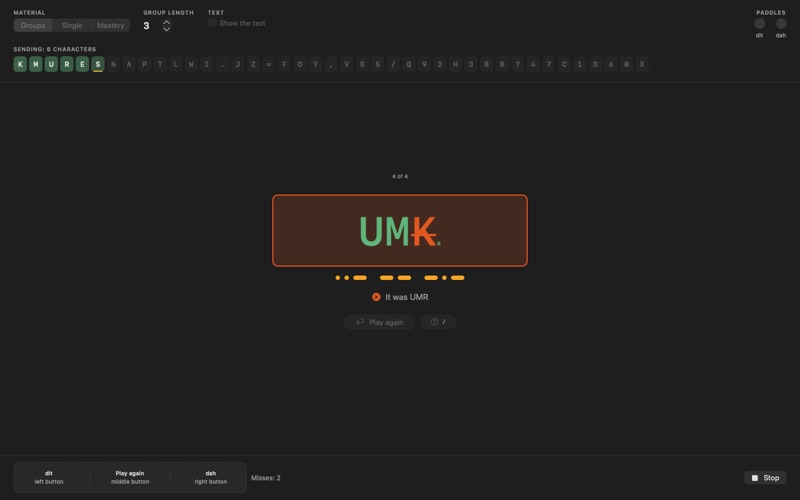
ECHO The app sends a short group. You send it back and stop; two seconds of silence end your answer. Then you see, character by character and in green or red, how close you were. Copy shows the group on screen instead of playing it, so you also train the direct link from letter to hand. Echo and Copy are what turn a receive trainer into a complete one.
DECODE AND CODE Two silent tests of the code itself, with no sound, no keyer and no time limit, grouped under Written in the sidebar. Decode draws Morse on screen as dots and dashes and you type the letters: single characters, groups, words or lines from a typical CW contact. Code shows letters and you enter them as dots and dashes, on the keyboard or with one press of your paddle per element. The summary names your mistakes, for example "Q read as X", and both modes keep their own statistics in Progress.
MADE FOR THE MAC Native SwiftUI app, light and dark. Works fully offline, needs no account, keeps every statistic in a local file you can export as JSON. Keys are bound to their physical position, so the layout stays the same on Polish, Dvorak or any other keyboard. Live input lamps show whether your chosen key pair actually works on your keyboard.
HELP AT HAND A Welcome window on first launch tests your key live before you start. Every scene has a ? button and Command-? opens Help with twelve short topics, in English and Polish. A few tips appear once, right where they matter.
WHAT IT IS NOT Timing shown while sending reflects your keyboard as much as your hand. Use it to learn the motion, not to grade it. Audio decoding of a radio's output is planned for a later version.
English and Polish.
People rate it
Sign in to rate this app. Honest is what counts.
No ratings yet. Tried it? Be the first to rate it.
More Education apps
Best new Education apps this week FluencyToolShadow a native Japanese sentence, hear your own voice back, and get scored.
 YoMoo: Read & Shadow JapaneseYoMoo turns real Japanese writing into graded reading practice: news articles, Wikipedia…
 KeyswingLearn music notes, rhythm and piano through playful practice in a magical forest.
 Uncle Math Homeschool - 6 to 8No Math Fear, Uncle Math Is Here
 Malachi SpeaksMalachi Speaks gives a voice to people who don't use speech
 SelvarisWatch evolution unfold in real time – on an entire planet