
SnapSheet: Scan & PDF
Not claimedKeep the paper that matters, without the pile
By Shanghai Moquan Biological Co., Ltd. · ProductivityWhy we expect it: A clear, well-described scanning app with local processing, honest limits, and a useful value proposition for everyday document needs.


About
Keep the paper that matters, without the pile. SnapSheet turns documents, notes and receipts into scans you can adjust, organize and share.
SCAN OR IMPORT Frame your document and tap the shutter when you are ready. Or choose photos from your library, arrange them in order and bring them into one document.
GET THE EDGES RIGHT Start with detected document edges, then fine-tune the corners and sides. A magnifier and small-step controls help with precise adjustments. Rotate the page, preview the result, and undo or redo your edits. Your original images are kept so you can return to them.
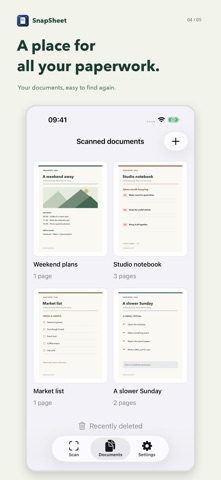
KEEP EVERY PAGE IN PLACE Name your documents and find them in a visual library. Add pages, change their order or replace a page without rebuilding the document. Pinch to zoom in and check the details before sharing.
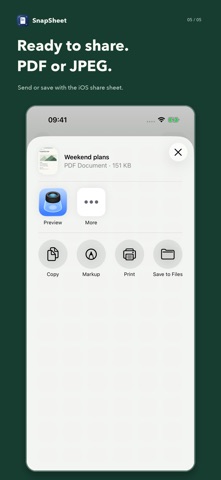
SHARE AS PDF OR JPEG Export a multipage PDF or individual JPEG images through the iOS share sheet. Choose High quality or Standard to suit the task.
LOCAL WORKING COPIES, ICLOUD BACKUP Image processing takes place on your device. Your working documents stay available offline, and SnapSheet automatically backs up editable scans to your iCloud Drive when it is available. Restore backups from Settings when you need them.
MADE TO FEEL AT HOME Choose English or Simplified Chinese, follow your system language, and switch between light and dark appearance. No SnapSheet account is required.
SnapSheet creates image-based documents. It does not perform OCR or create searchable text in PDFs. iCloud backup requires iCloud Drive and available storage; it does not automatically merge edits across devices.
People rate it
Sign in to rate this app. Honest is what counts.
No ratings yet. Tried it? Be the first to rate it.