
Soltura: Learn Spanish
Not claimedPractice spoken Spanish for everyday life and virtual assistant work, one conversation…
By Sebastian Gonzales · EducationWhy we expect it: Clear value for VA professionals, a well-organized description, and honest notes that scheduling workdays are offline simulations.


About
Practice spoken Spanish for everyday life and virtual assistant work, one conversation at a time. Soltura helps you speak, listen, read, and remember phrases you can use in real situations, on iPhone and iPad.
SPEAK WITH SOL • Step into guided, scripted conversations with Sol and other characters. • Practice everyday moments and client-facing situations with clear prompts. • Choose neutral Latin American, Mexican, or Spain Spanish and follow a path from A1 to C1.
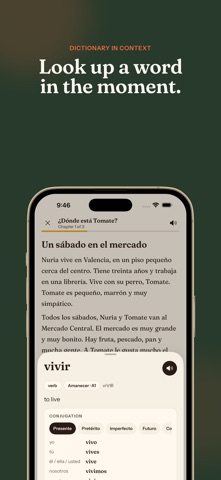
LISTEN AND READ • Train with short listening scenes and stories. • Read Spanish with English translations and context. • Hear language in realistic situations at a pace that leaves room to think.
MAKE GRAMMAR CLICK • Use short guides to understand patterns and common exceptions. • Reinforce each idea with quick drills and examples you can reuse.
GROW A USEFUL VOCABULARY • Review words with spaced repetition. • Look up words in the built-in dictionary. • Save up to five personal phrases on the free plan, or save without a limit with Soltura Pro.
PRACTICE SPANISH FOR VA WORK • Follow Ruta VA, a role-focused roadmap for virtual assistants. • Rehearse language for client conversations, scheduling, customer support, and follow-ups. • Try a scheduling workday: clarify a Spanish request, find a meeting time that works for both people, confirm the details in Spanish, and brief your manager in English. • Workdays are offline simulations. No real invitations, emails, or messages are sent. • With Soltura Pro, practice changed scheduling cases, invoice follow-ups, and customer handoffs. • Hear a workday request read aloud and rehearse your reply. Your speech is transcribed on this device for you to read back. It is not scored and does not complete any step. • After a scheduling workday, preview a short practice summary and choose whether to share it. It leaves out names, dates, and messages.
SPEECH ON YOUR DEVICE • Open Speech setup in Settings to check microphone access, download Apple's Spanish speech model, and see which Spanish voice is installed.
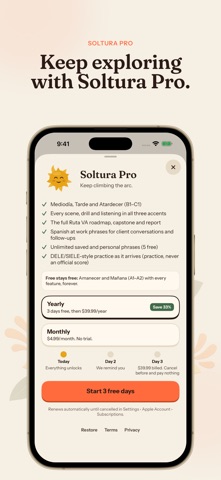
Learn at your own pace, without streak pressure or guilt. A1 starter lessons, everyday phrases, the complete dictionary, spaced review, the first two Ruta VA stages, and the scheduling workday stay free. Either Soltura Pro plan unlocks every spoken scene, drill, grammar guide, listening lesson and story from A1 to C1, plus the full Ruta VA roadmap, changed workday cases, invoice and customer workdays, and unlimited personal phrase saves.
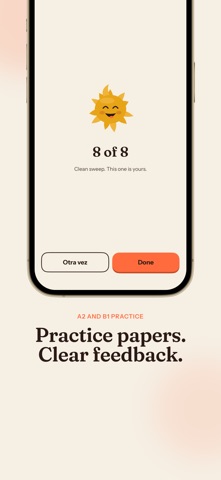
Practice papers help you get ready for Spanish proficiency exams. Their scores are for practice only. Soltura is independent and not affiliated with any exam provider.
No account is required. Speech checks are processed on-device when iOS supports the selected locale.
Terms of Use (Apple Standard EULA): https://www.apple.com/legal/internet-services/itunes/dev/stdeula/
People rate it
Sign in to rate this app. Honest is what counts.
No ratings yet. Tried it? Be the first to rate it.
More Education apps
Best new Education apps this week FluencyToolShadow a native Japanese sentence, hear your own voice back, and get scored.
 YoMoo: Read & Shadow JapaneseYoMoo turns real Japanese writing into graded reading practice: news articles, Wikipedia…
 KeyswingLearn music notes, rhythm and piano through playful practice in a magical forest.
 Uncle Math Homeschool - 6 to 8No Math Fear, Uncle Math Is Here
 Malachi SpeaksMalachi Speaks gives a voice to people who don't use speech
 SelvarisWatch evolution unfold in real time – on an entire planet