
Sorts - Organize Screenshots
Not claimedEvery screenshot was a plan: a place to try, a date to keep, a thing to buy
By SideStreet Software Inc · ProductivityWhy we expect it: A clear, well-structured description solves a real pain point, with thoughtful privacy design and a strong, specific value proposition.


About
Every screenshot was a plan: a place to try, a date to keep, a thing to buy. Then it joined the pile. Sorts turns the pile into things done.
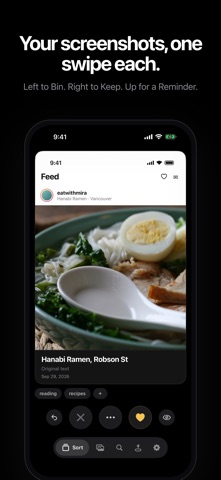
SWIPE TO SORT Sorts shows your screenshots one card at a time, titled with what it read on each. Swipe up for a Reminder, right to Keep, left to Bin. Undo is one tap.
REMINDERS, WRITTEN FOR YOU A Reminder goes straight into Apple Reminders, titled from the screenshot.
TAG IT ONCE, IT FILES ITSELF Give a tag a home, and every Keep with that tag goes there: • Photos albums, one per tag, or only the tags you choose • Calendar events, on the date the card shows • Places, found with Apple Maps and listed nearest first • Mem, or a webhook to your own server Apple's on-device models suggest tags and titles. One tap takes them off.
FIND IT AGAIN Search the text inside every screenshot. Filter by shelf or tag, and add or remove a tag on many at once.
CLEAR THE PILE Binned screenshots leave Photos together, in one tap, when you say so. Sorts keeps a small preview, so you still recognise what you kept after the original is gone.
SHARE TO SORTS Share a picture or a link from any app, and it joins the deck.
PRIVATE BY DESIGN No account, no server, no tracking. Sorts reads your screenshots on your iPhone with Apple's on-device frameworks. A screenshot leaves your phone only if you send it somewhere yourself.
Privacy policy: https://getsorts.com/privacy/ Terms of Service: https://getsorts.com/terms/
People rate it
Sign in to rate this app. Honest is what counts.
No ratings yet. Tried it? Be the first to rate it.