
SpaceShrink: Video Compressor
Not claimedSmaller photos and videos
By Charles Vevea · Utilities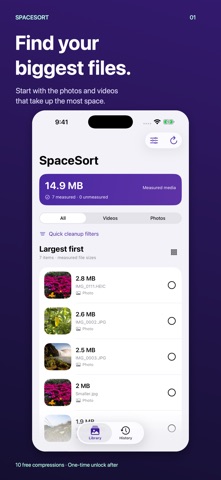


In short
SpaceShrink: Video Compressor makes smaller copies of photos and videos in your Photos library, so originals can be removed only after you review the results. It is aimed at iPhone users who need to free storage, and it lists files by size with options to filter, preview, and batch process. Processing stays on the device, and the app has no ads or tracking.
Summary by Debuts, based on the App Store listing.About
Smaller photos and videos. Keep the memories on your phone.
SpaceShrink creates smaller copies in your Photos library, so you can keep the moments you love while making room for more. Find your biggest files, choose a compression setting, and compare the saved result before deciding whether to remove the larger original.
YOU CHOOSE WHAT TO KEEP Compression saves a new copy first. Originals stay until you explicitly choose to delete them. Keep individual originals during batch review, or keep them all. Freeing storage requires removing the larger originals after you are happy with the copies. Compression can reduce resolution and detail; results vary by file and setting.
FIND WHAT TAKES UP SPACE Browse photos and videos by measured file size. Filter by media type, PNG images, or accessible hidden items. Browse a list or three-column grid. Hold a thumbnail and drag to select multiple items; swipe over text to scroll. Preview photos, videos, and Live Photos before deciding.
MAKE SMALLER COPIES Resize PNGs while preserving transparency, make smaller JPEG copies of supported photos, or compress ordinary videos. Copies keep the Photos capture date and time, location, hidden status, and favorite status. Review the original and smaller copy before deleting anything.
WORK THROUGH A BATCH Download full-size iCloud items as needed, then compress and verify each saved copy. Review a scrolling list of results and keep individual originals. Supported background processing and a saved remaining queue help when a batch is interrupted; iOS controls background availability.
EXPORT YOUR ORIGINALS Use the iOS share sheet, available Files providers, or a compatible connected drive. Export history helps you remember what you shared. Always verify uploads at the destination before deleting originals.
CLEAR, ONE-TIME PRICING Scanning, exports, history, and review are free. Try 10 successful compressions on a device. A single in-app purchase unlocks unlimited supported compression; no subscription. Failed attempts do not use the allowance. Restore the unlock with the same Apple Account.
PRIVATE BY DESIGN Media processing stays on your device. No ads, tracking SDK, or SpaceShrink account. Apple handles iCloud and purchases; exports go only to the destinations you choose.
Requires iOS 26 or later. Hidden items depend on iOS permissions and album access. Live Photo compression does not preserve motion; still conversion requires a warning, and batches skip Live Photos. Some special formats cannot be compressed. File sizes are Photos resource sizes, not exact on-device usage. Compression can lose detail or special metadata. Deleting originals from iCloud Photos affects synced devices. Storage savings depend on the original, chosen settings, deletion, and Photos syncing.
People rate it
Sign in to rate this app. Honest is what counts.
No ratings yet. Tried it? Be the first to rate it.
More Utilities apps
Best new Utilities apps this week Vodoalarm: vodostaji BiHVodoalarm javlja kad tvoja rijeka naglo raste, pa ne moraš stalno gledati vodostaje
 Rokey: Romanian KeyboardType Romanian without worrying about diacritics
 Vibe Island: AI Agent MonitorVibe Island is a command center for the AI coding agents running on your Mac
 Private AuthenticatorPrivate Authenticator keeps your two-factor authentication codes on your own Apple…
 Photo Clean: Photo CleanupA crowded camera roll?
 Songbird AlarmWhat if the morning didn't have to start with a loud noise?