
Spendo - Follow Your money
Not claimedWhere did your money go?
By Alp Eren Keskin · Finance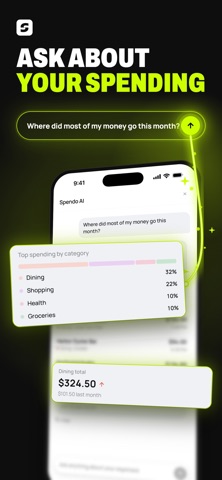


About
Where did your money go? Spendo works it out from a photo of what you paid for.
Snap a receipt, an invoice or an order screen. Spendo reads the total, the date, the place, the category and every item you bought. Nothing left to type.
PAPER IS OPTIONAL Online purchases don't come with a paper receipt, but they do leave an order confirmation, an emailed receipt, a payment confirmation or a card transaction detail. Screenshot it and it lands in the same table. Anything you haven't paid for yet (a cart, a product page, a pending payment) doesn't count as an expense.
YOUR OWN INFLATION RATE The items on your receipts don't disappear. Spendo keeps what you paid for the same product at each store, per liter and per kilo, and works out how much pricier your basket got from your own shopping.
CATCH EVERY PRICE HIKE Subscriptions and bills sit on a calendar. You see what's still due this month and get a reminder the day before a payment. When a subscription goes up, it stays on the list and shows the increase.
YOUR SPENDING, MAPPED If you allow location, each expense is saved with it. The map shows where your money went; tap a pin to open that expense. Say no and expenses are saved without a location.
ASK SPENDO AI "Where did most of my money go this month?" or "How much did I spend on coffee last month?" The answer is worked out from your own expenses.
NO BANK CONNECTION Spendo never asks for your bank login. It reads the purchase itself, which is why it can see individual items. A bank statement says "grocery"; a receipt says the price per liter.
ALSO - Manual entry for expenses with nothing to photograph: cash, a lost receipt - Multi-currency: spending abroad converts at the rate of the moment it was saved - Export your expenses as CSV - Sign in with Apple: no new password, and you can hide your email - Photos are kept in private storage, not at a public address
FREE AND PRO The free version scans 40 expenses a month and shows the last 60 days. Spendo Pro unlocks Spendo AI, your full history, product price tracking, your personal inflation rate, price-hike tracking and 800 scans a month.
Spendo Pro is an auto-renewing subscription. Payment is charged to your Apple Account when you confirm the purchase. The subscription renews automatically unless you cancel at least 24 hours before the end of the current period. You can manage or cancel it in your App Store account settings.
Terms of Use: https://tryspendo.com/en/terms Privacy Policy: https://tryspendo.com/en/privacy
People rate it
Sign in to rate this app. Honest is what counts.
No ratings yet. Tried it? Be the first to rate it.