
SplitSnap: Receipt Splitter
Not claimedGood food
By Nathan Langer · FinanceWhy we expect it: Clear value, on-device and offline splitting, and a sample table make this a promising receipt splitter.



In short
SplitSnap: Receipt Splitter is a finance app for dividing a restaurant bill among a group. Users scan a receipt or enter items, assign what each person had, and add tips, tax, service charges, and discounts to see an itemised total per person. It works offline, needs no account, and reads receipts on the iPhone itself.
Summary by Debuts, based on the App Store listing.About
Good food. Fair splits.
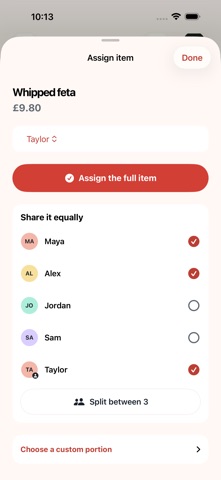
SplitSnap makes sharing the cost of a meal easy. Scan a receipt, choose a photo or enter items yourself, then add everyone at the table and assign what they had.
Share dishes equally, divide quantities or set custom shares. Add tips, service charges, tax and discounts, and see an itemised total for each person.
Keep your splits in local history. Copy a summary, share it with another app or save a summary image to Photos.
Receipt reading happens on your iPhone. No account is required and the core splitting flow works offline. On supported devices, Apple Intelligence can enhance receipt reading on-device.
Try the sample table at The Merry Fig to explore the app before scanning your own receipt.
People rate it
Sign in to rate this app. Honest is what counts.
No ratings yet. Tried it? Be the first to rate it.
More Finance apps
Best new Finance apps this week NjukiYour rent should do more than pay for where you live
 Qwiky AIQuiky AI helps you understand and organise your everyday finances in one clear place
 Set Aside for TaxFreelance money arrives without anything taken out of it
 MidRate: Currency ConverterMidRate converts at the mid-market rate, the midpoint between what banks buy and sell a…
 MesuraMesura answers one question: how much can I safely spend before my next pay?
 Inflation WatchInflation Watch turns official price data into plain English