
Sprigtime
Not claimedSprigtime turns chores, homework and healthy routines into screen time your child can…
By Daniel Stuart · LifestyleWhy we expect it: Thoughtful, privacy-first screen time app with clear value, a well-written description, and useful optional features for families.




In short
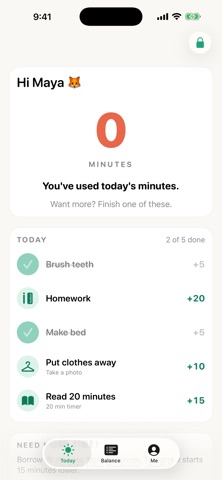
Sprigtime is a lifestyle app that ties chores, homework and healthy routines to screen time. Parents set how many minutes each task earns and choose which apps pause when minutes run out, using Apple's Screen Time. A notable detail is that photo proofs stay on the device and are deleted once a task is approved or declined.
Summary by Debuts, based on the App Store listing.About
Sprigtime turns chores, homework and healthy routines into screen time your child can see, understand and manage.
YOU SET THE RULES • Create tasks and decide how many minutes each one earns, from quick templates or your own. • Choose which apps, categories and websites pause when minutes run out, using Apple's Screen Time picker. • Approve tasks, give or remove time, lock now, or set bedtime and school hours, all behind your Parent PIN.
THEY LEARN TO MANAGE IT • A big, clear minutes balance and a simple history of every minute earned and used. • Tap Start Play; minutes count down while the chosen apps are in use. • At zero, those apps pause with a friendly screen until more minutes are earned.
FAIR AND FLEXIBLE • Daily allowance, daily maximum and carry-over limits. • Optional "borrow from tomorrow", paid back automatically. • Parent-controlled behavior deductions with a way to earn time back.
OPTIONAL PHOTO PROOF • Ask for a photo on tasks you want to check. Photos stay on the device and are deleted as soon as you approve or decline.
PLAIN-LANGUAGE SETUP • Describe a routine like "every school morning make the bed and brush teeth" and Sprigtime drafts the tasks for you to review. Uses Apple's on-device intelligence where available.
PRIVATE BY DESIGN • No account. No ads. No tracking. No analytics. • Tasks, balances and photos stay on this iPhone.
REQUIREMENTS • Uses Apple Screen Time (Family Controls). Set up Sprigtime on the iPhone you want to manage. • iOS 17 or later.
People rate it
Sign in to rate this app. Honest is what counts.
No ratings yet. Tried it? Be the first to rate it.
More Lifestyle apps
Best new Lifestyle apps this week askoraAI 회상 노트
 Familjekalender – familjens årFamiljekalender är en delad kalender för hela familjen, där varje dag kan bära ett foto…
 My Anime TrackerAnime watch order, no guesswork.
 WatchLux: Animated Watch FacesOver 750 animated watch faces for Apple Watch and Wear OS
 SCNT ControlSCNT conecta tu teléfono con tu difusor de aroma por Bluetooth y te da el control…
 Sakinah: Quran, Adhkar & DuaSakinah brings the Qur'an, the prayer and daily remembrance together in one calm app, in…