
Stackshot: Long Screenshot
Not claimedTurn a pile of screenshots into one clean, long image
By DF Vietnam Company Limited · UtilitiesWhy we expect it: Clear value, a thorough description, and an on-device privacy approach make this a convincing utility for everyday screenshot stitching.


In short
Stackshot: Long Screenshot stitches a set of screenshots, up to 30 at a time, into one long image on the iPhone, with no watermark on exports. It suits people who need to capture long chats, receipts, articles or recipes, and it groups screenshots taken together so one tap selects a whole conversation. Images are processed on the device and never uploaded.
Summary by Debuts, based on the App Store listing.About
Turn a pile of screenshots into one clean, long image. Pick your screenshots and Stackshot stitches them instantly: no Stitch button, no watermark, no locked editing tools.
Perfect for long chats, receipts, articles, recipes, directions and anything else that won't fit on one screen.
STITCHING YOU CAN TRUST • Stitches automatically as soon as your screenshots load • Checks every seam. If it isn't sure, it tells you instead of guessing, so a missing line never slips through unnoticed • Drag any seam to fine-tune it • Stitch vertically or side by side
FINDS THE RIGHT SCREENSHOTS • Shows your screenshots first, not your whole camera roll • Groups screenshots you took together, so one tap selects a whole conversation • Up to 30 images per stitch, in the order you choose
LONG PAGES FROM A SCREEN RECORDING • Turn a screen recording of a scrolling page into one long image • Works with recordings you already have. No setup, no restart
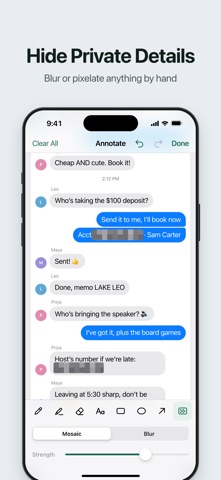
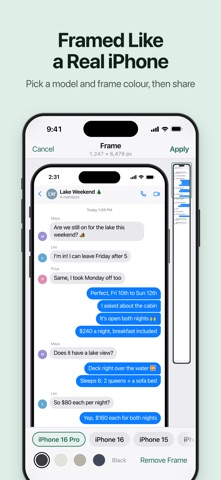
EDIT FOR FREE • Crop and align • Draw, add text, arrows and shapes • Blur or pixelate private details by hand • Put your image in an iPhone frame • Magic enhance for a crisper export • Save at full resolution, never watermarked
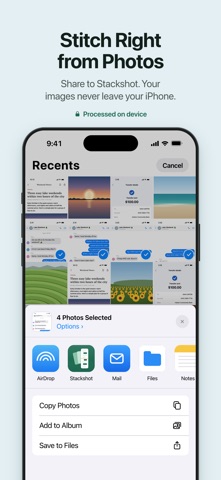
SHARE FROM ANYWHERE • Stitch straight from the Photos app with the share sheet • Save to Photos or share in one step
PRIVATE BY DESIGN Your images are processed on your iPhone and never uploaded.
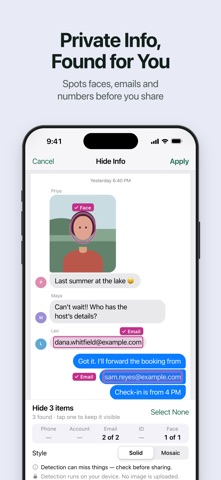
STACKSHOT PRO Stackshot is free, with ads, and saves or shares stitches of up to 5 images. PRO removes every ad, saves and shares stitches of any size (up to 30 images), and lets the app do the tedious work for you: • Auto-redact: finds emails, faces, and Vietnamese phone, bank account and ID numbers. You review each one before it's hidden • Text extraction: copy and search the text in your screenshots • Batch stitching: stitch several conversations in one go
SUBSCRIPTION TERMS • Monthly and Yearly plans are available. • Payment is charged to your Apple ID account at confirmation of purchase. • Subscription automatically renews unless auto-renew is turned off at least 24 hours before the end of the current period. • Your account will be charged for renewal within 24 hours prior to the end of the current period, at the price of the selected plan. • Manage your subscription or turn off auto-renewal anytime in Settings > [your name] > Subscriptions after purchase.
Terms of Use (EULA): https://www.apple.com/legal/internet-services/itunes/dev/stdeula/ Privacy Policy: https://dfvietnam.top/privacy
People rate it
Sign in to rate this app. Honest is what counts.
No ratings yet. Tried it? Be the first to rate it.
More Utilities apps
Best new Utilities apps this week Vodoalarm: vodostaji BiHVodoalarm javlja kad tvoja rijeka naglo raste, pa ne moraš stalno gledati vodostaje
 Rokey: Romanian KeyboardType Romanian without worrying about diacritics
 Vibe Island: AI Agent MonitorVibe Island is a command center for the AI coding agents running on your Mac
 Private AuthenticatorPrivate Authenticator keeps your two-factor authentication codes on your own Apple…
 Photo Clean: Photo CleanupA crowded camera roll?
 Songbird AlarmWhat if the morning didn't have to start with a loud noise?