
Stickit: Sticky Notes Widget
Not claimedStickit puts your notes right on your home screen, like sticky notes on a fridge
By Kitae Kim · ProductivityWhy we expect it: Clear, distinctive home screen widget idea with a playful paper theme range, though the app has no ratings yet.



About
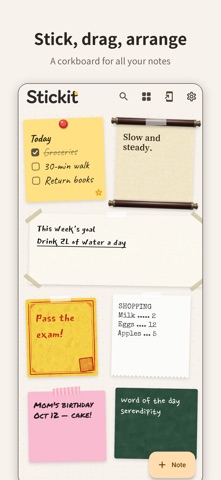
Stickit puts your notes right on your home screen, like sticky notes on a fridge. The note you write in the app shows up on the widget exactly as it looks, so your to-dos and reminders are there every time you look at your phone.
Home screen widgets • Each widget shows your note just like in the app: same theme, font and text size. • Tap a widget to open that note instantly.
A board full of sticky notes • Drag notes around, or tap Arrange to line them up neatly. • Star important notes to keep them at the front. • Long-press a note to pick its card size • Undo and redo while editing
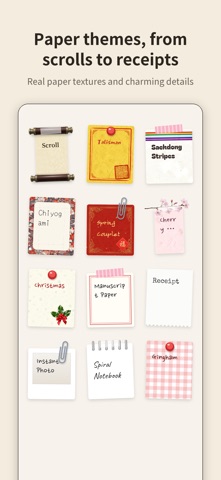
Lots of paper themes • From classic sticky notes to Korean hanji, scrolls, wall posters, talismans and saekdong stripes, plus newspaper, airmail, blueprints, receipts, chiyogami and spring couplets, and seasonal cherry blossom and Christmas themes. • Real paper textures and attachments like tape, pins and clips.
Fun to write • Bold, italic, underline, strikethrough and checklists • Handwriting, brush and typewriter fonts, plus your device font • Lots of note colors, with lined, grid, dot and legal pad paper
Find, share and keep • Search to find any note in a moment. • Share notes to messengers or email, or just copy the text. • Deleted notes stay in the Trash for 30 days.
No sign-up needed • Your notes are stored only on your device.
* Free: 2 home screen widgets and the basic themes and fonts, with a small ad at the top of the board. Premium (one-time purchase): no ads, unlimited widgets, and every theme and font.
Available in English, Korean, Japanese and Chinese (Simplified and Traditional).
People rate it
Sign in to rate this app. Honest is what counts.
No ratings yet. Tried it? Be the first to rate it.