
Still - Block Apps & Focus
Not claimedStill helps you reclaim your attention—and helps families keep kids safer online
By kifayat Ullah · ProductivityWhy we expect it: Clear value for focus and parental controls, with a privacy-first design built on Apple's Screen Time and a broad audience.



In short
Still - Block Apps & Focus is a productivity app that blocks distracting apps and websites during timed focus sessions. Parents can set up child profiles that limit selected apps and adult sites, and it uses Apple's Screen Time technology so blocking stays on the device. What stands out is the "session armor" option, which can block new app installs during a session to make bypassing it harder.
Summary by Debuts, based on the App Store listing.About
Still helps you reclaim your attention—and helps families keep kids safer online.
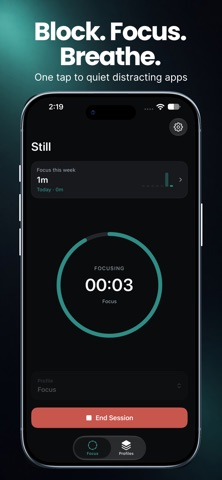
Block distracting apps and websites, then start a focus session in one tap. Parents can create protection profiles to stop children from opening selected apps and adult or unwanted websites during study or screen-time limits. Still uses Apple’s Screen Time technology so blocking stays private and on your device.
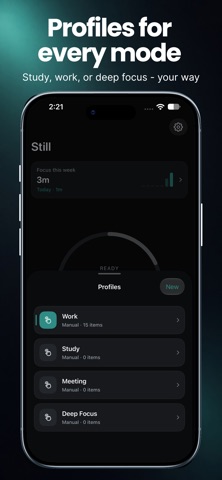
WHY STILL • Block apps & categories during focus • Safari website blocking for sites you choose • Adult content filter option for safer browsing • Family / child protection profiles—limit apps kids shouldn’t use • Custom profiles for study, work, deep work, or kids’ routines • Schedules, breaks, and session protection options • NFC or QR unlock keys for stronger commitment • Home Screen widgets with weekly focus stats • Clean dark/light themes you can customize
FAMILY & CHILD PROTECTION • Create a kids profile that blocks games, social apps, or any apps you select • Block adult and unwanted websites in Safari • Keep focus on for homework, bedtime, or family time • Session armor options help prevent easy bypass (e.g. blocking new installs during a session)
HOW IT WORKS 1. Create a profile and choose what to block 2. Start Focus when you (or your child) need protected time 3. Distracting apps and blocked sites stay shielded until the session ends 4. Track today and this week’s focus time in Insights & widgets
BUILT FOR REAL LIFE • Students who need distraction-free study • Professionals who want deep work blocks • Parents who want safer, more focused screen time for kids • Anyone breaking doomscrolling habits
Privacy-first: your selection lists and session data stay on your iPhone. Still may show ads to keep the app available.
Download Still and start your next focus—or family protection—session today.
People rate it
Sign in to rate this app. Honest is what counts.
No ratings yet. Tried it? Be the first to rate it.
More Productivity apps
Best new Productivity apps this week ChickMark: Habit TrackerChickMark is a simple habit tracker for routines, goals, and reminders
 Dayflint: One Thing a DayToo many priorities?
 Snappy Do ItSix connected modes. One traceable journey.
 Fristo CAFMFristo is the app for Fristo CAFM, the facility management software
 UhWhat? Voice NotesCatch the thought before it disappears
- BeginAnywayMorning alarm for hard tasks: set one task, prove you started, build a streak