
Stillkey: Focus & App Blocker
Not claimedMake distractions inconvenient
By TALEPPO ARGE BILISIM VE YAZILIM DANISMANLIK HIZMETLERI TICARET LIMITED SIRKETI · Productivity


In short
Stillkey: Focus & App Blocker uses Apple's Screen Time to block chosen apps, categories and Safari sites during focus sessions, schedules or daily limits. It is aimed at people who want a physical or timed obstacle before opening distracting apps. One standout feature is the printed QR key, which must be scanned from another location to lift a block.
Summary by Debuts, based on the App Store listing.About
Make distractions inconvenient.
Stillkey blocks the apps and websites you choose with Apple's Screen Time — and puts a small, real obstacle between you and the automatic scroll. Not willpower. Friction.
BLOCK WHAT PULLS YOU IN • Pick apps, whole categories and Safari websites with Apple's own picker • Start a focus session: 30, 60, 90 minutes or your own length • Schedules for work hours, study, mornings and nights • Daily limits: e.g. social apps 25 minutes a day, then blocked until midnight
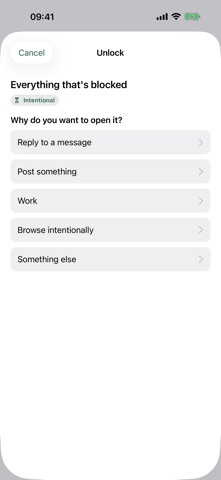
CHOOSE HOW HARD IT IS TO GET PAST • Flexible — pause or end any time • Intentional — say why, take a short pause, get 5, 10 or 15 minutes • Physical key — scan the QR key you printed and left somewhere inconvenient • Hard Mode — no early access until the timer ends
A PHYSICAL KEY, NO HARDWARE TO BUY Print your key, put it in the kitchen, and your bed is no longer the easiest place to open social media. A screenshot on the same iPhone can't be scanned by it; a copy on another device would work — so keep it on paper.
ALWAYS A WAY OUT Emergency Unlock is always available, never costs money, and only takes a short wait. You can also turn off Screen Time access in iOS Settings at any time — Stillkey adds friction, it doesn't lock you out of your phone.
SEE WHAT YOU PROTECTED Protected time, completed sessions and deliberate opens — today and this week. Calm numbers, no shame, no streak pressure.
PRIVATE BY DESIGN • No account, no ads, no tracking • Your selections, usage and keys stay on your iPhone • Optional anonymous statistics only if you allow them
Stillkey Pro (monthly, yearly or once for lifetime) unlocks unlimited profiles and apps, schedules, more daily limits, Intentional Open, physical keys and Hard Mode. The free version includes focus sessions with up to 3 apps, categories or sites and one daily limit.
Subscriptions renew automatically unless cancelled at least 24 hours before the end of the period. Manage them in your Apple account settings. Terms: https://stillkey.taleppo.com/terms · Privacy: https://stillkey.taleppo.com/privacy
People rate it
Sign in to rate this app. Honest is what counts.
No ratings yet. Tried it? Be the first to rate it.
More Productivity apps
Best new Productivity apps this week ChickMark: Habit TrackerChickMark is a simple habit tracker for routines, goals, and reminders
 Dayflint: One Thing a DayToo many priorities?
 Fristo CAFMFristo is the app for Fristo CAFM, the facility management software
- BeginAnywayMorning alarm for hard tasks: set one task, prove you started, build a streak
 DHUDEDHUDE Analityxs es la herramienta de gestión diaria para grupos de restauración y ocio…
 FTC BIOBUZZ Scorer & TrainerBIOBUZZ Scorer is a free, ad-free scorer for the 2026–2027 FTC season, built on…