Stox – Menu Bar Stocks
Not claimedStox puts stock quotes in your Mac's menu bar, compressed to one small, glanceable spot
By 昊 吴 · FinanceWhy we expect it: Clear value for Mac users who want quotes in the menu bar, with thoughtful one-click controls and broad market coverage.


About
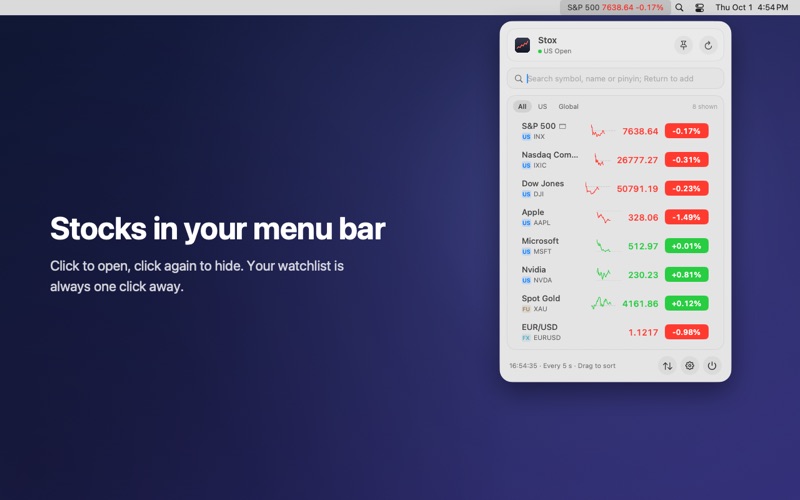
Stox puts stock quotes in your Mac's menu bar, compressed to one small, glanceable spot. Look up, see what moved, get back to work. When you don't want quotes on screen, right-click the icon and only a quiet icon remains.
ONE CLICK TO OPEN, ONE CLICK TO HIDE • Left-click the menu bar icon to open the glass panel; click again, click elsewhere or press Esc to close it. • Right-click to switch between showing quotes and showing only the icon. • A global hotkey (Control-Option-S by default, configurable) opens the panel from any app. No Accessibility permission needed. • Pin the panel to keep it floating anywhere on screen.
QUOTES IN THE MENU BAR • Show any stocks right in the menu bar, on one line or stacked in two rows, with red-up/green-down, green-up/red-down or no colors at all. • Rotate through several symbols, or show your day's profit instead. • Optionally show only the icon while the market is closed.
MARKETS AND CHARTS • Shanghai, Shenzhen and Beijing A shares, Hong Kong and US stocks, major indices and ETFs, mutual funds (net asset value), global indices such as the Nikkei 225, FTSE 100 and DAX, international futures, precious metals and FX. • English names for indices, US and Hong Kong stocks, futures and FX. • Search by code, name or pinyin initials; paste several codes to add them all at once. • Intraday, five-day, daily, weekly and monthly charts with volume and moving averages; order book, fund flow and limit prices for A shares; pre-market and after-hours prices for US stocks. • A-share top gainers, losers and industry rankings.
HOLDINGS AND ALERTS • Enter shares and cost to see your position's profit, today's profit and totals per currency, converted to one number when you hold several currencies. • Record buys, sells and dividends; see realized profit, a profit calendar and allocation. • Price, percentage, take-profit and stop-loss alerts as system notifications, plus limit-up/limit-down, 52-week high/low and rapid-move alerts. • Hide all amounts with one click when sharing your screen.
SYNC AND PRIVACY • Sync your watchlist, groups, holdings, alerts and display settings across your Macs through your own iCloud. • Export and import a backup file any time. • No account, no sign-up, no API key, no analytics, no ads. Your data stays on your Mac and in your iCloud.
LIGHT AND NATIVE • Written in Swift with AppKit and SwiftUI. Small, fast and low on memory; refreshes less often when markets are closed and stops while your Mac sleeps. • Uses Liquid Glass on macOS 26 and a glass material on earlier versions. Requires macOS 13 or later.
Quotes come from the public web quote services of Tencent Finance and Sina Finance. Hong Kong quotes are delayed by about 15 minutes, and other quotes may be delayed as well. Data is for reference only and is not investment advice.
Stox is open source under the GPL-3.0 license: github.com/whrss9527/stox
People rate it
Sign in to rate this app. Honest is what counts.
No ratings yet. Tried it? Be the first to rate it.