
SuperFont - Font Installer
Not claimedThe fonts you have, ready to use on your device
By Hyewon Lee · Utilities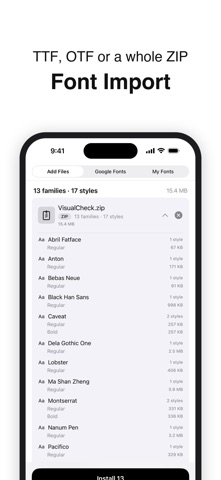


About
The fonts you have, ready to use on your device.
iOS doesn't let apps install fonts directly. It asks for a special file called a configuration profile instead — something an IT pro usually puts together for company devices. SuperFont makes that file for you and shows you what to tap on every screen until you're done. The fonts you've been collecting can finally show up in Notes, in documents, in slides.
■ The fonts you already have Bought or downloaded, fonts pile up — but an iPhone or iPad gives you no easy way to even open them. · Add font files, or a ZIP just as it came, and SuperFont finds the fonts inside for you. · If the same font shows up more than once, it's tidied into one, so you never install it twice. · Files that can't be installed are flagged up front with the reason, so there are no surprises at the end.
■ An install file that's made for you Installing a font takes a special file, and making one yourself is fiddly. · Just pick your fonts and the file is made automatically, so you don't need to know the complicated parts. · The name shown in Settings is filled in for you, so you can tell which fonts it was later on. · You can install several fonts in one go, so you don't repeat the same steps over and over.
■ An install that never leaves you stuck Installing takes you through Safari and Settings, and it's easy to get lost on your own. · Every step shows the real screen, so you can spot what to tap right away. · If an unfamiliar warning pops up, you're told right there why it's fine, so you can keep going with confidence. · Finish in Settings, come back, and the app moves on to the next step by itself.
■ Your fonts at a glance Once fonts are installed, it's easy to forget what you've put on your device. · Installed and not-yet-installed fonts are clearly marked in one list, so you always know where things stand. · Each font's name appears in the font itself, so you see how it looks instead of guessing from the name. · You can swap the preview text for words you actually use, so you notice early if a font is missing letters you need.
■ Time to pick something new Finding a font you love usually means hopping from site to site. · You can browse thousands of free fonts right inside the app. · You can see at a glance whether a font supports your language, so nothing looks broken once you use it. · When one catches your eye, you can install it right there.
■ When you need them back Reset your device or remove the profile, and your fonts go with it. · The app keeps the fonts you installed, so you don't have to track down the originals. · You can pick just the ones that went missing and bring them back in one go.
Your font files and install history stay on your device. No account, no sign-in needed.
People rate it
Sign in to rate this app. Honest is what counts.
No ratings yet. Tried it? Be the first to rate it.