
TakeFlow: 4K Vertical Camera
Not claimedRecord once
By Guilherme Quintero Lorenzi · Photo and videoWhy we expect it: Recording one take for both landscape and vertical is a clear, useful idea, and the description explains it well.




About
Record once. Post everywhere.
TakeFlow keeps your original video, up to 4K, and makes a vertical 9:16 version of the same take while you record. Tap a person or an object and Auto Follow keeps it in the frame. Stop, and the vertical is ready. No second take, no editing.
ONE TAKE, EVERY FORMAT • The original in landscape, up to 4K at 60 fps on supported iPhones • A vertical 9:16 version, made on its own when you stop • Prefer 4:5 or 1:1 for feeds? Pick it as the second format • Record upright and get a 16:9 landscape version instead
AUTO FOLLOW, LIVE • Tap someone or something in the viewfinder and the frame follows it • Snappy for quick moves, Smooth for a gimbal-like glide • Drag the corners of the 9:16 guide to frame tighter • Switch between the front and back cameras without stopping the take
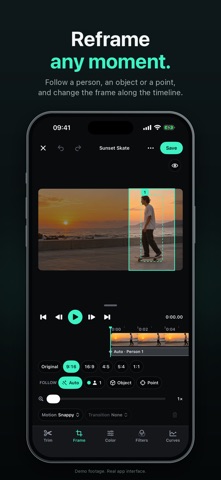
A REAL EDITOR • Reframe any take later: follow a person or an object, or set marks with transitions • Trim, split and zoom clips on a timeline • Color, filters and curves, with presets you can save, share and reuse • Copy the color edits of a photo you edited in Photos onto your video
BUILT FOR SHOOTING • Exposure, focus, AE/AF lock, lenses, grid, level and safe zones • Timer, and start or stop with the volume buttons • REC light: the flash blinks softly so people can see you're recording • Auto-save to Photos after each take, or record originals to an external USB-C drive
YOUR VIDEOS STAY YOURS Everything is processed on your iPhone. No account, no ads, no tracking. Organize takes in folders and favorites, then save or share the version you need.
TAKEFLOW PRO TakeFlow is free to download. Recording, importing and editing require TakeFlow Pro, and every plan includes every feature: • Monthly subscription • Yearly subscription, with a 7-day free trial for eligible new subscribers • Lifetime: one payment, no subscription Prices are shown in the app before you buy. If your plan ends, you can still watch, save, share and delete your takes.
Subscriptions renew automatically unless canceled at least 24 hours before the end of the current period. Payment is charged to your Apple Account when you confirm the purchase, or when the free trial ends. Manage or cancel in Settings › Apple Account › Subscriptions. Lifetime is a one-time purchase and never renews.
Terms of Use (EULA): https://www.apple.com/legal/internet-services/itunes/dev/stdeula/ Privacy Policy: https://guilhermequinterolorenzi.com/fourk-privacidade
People rate it
Sign in to rate this app. Honest is what counts.
No ratings yet. Tried it? Be the first to rate it.