
TalkKeep
Not claimedMeeting notes that write themselves
By 淞 张 · ProductivityWhy we expect it: Clear value and a strong on-device privacy focus make this a compelling meeting notes tool for Mac users.


About
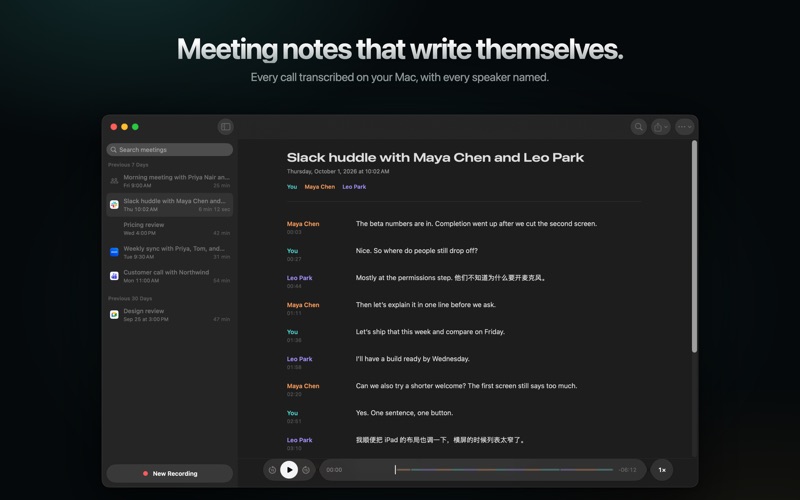
Meeting notes that write themselves.
TalkKeep records your calls on your Mac — your microphone and the meeting's sound — and turns them into a transcript that names every speaker. No bot joins the call. Nothing is uploaded.
• Starts when your call does. When a call begins in Zoom, Teams, Slack, FaceTime, Webex, or a meeting in your browser, a small window offers to record it. One click. • Live captions while you talk, then a transcript that reads like a document: punctuation, paragraphs, and every speaker. • Knows who said what. Voices are told apart on your Mac. Name someone once, and later meetings recognize them. • Fluent in mixed languages. Switch between English and Chinese mid-sentence and both are kept — in 30 languages and 22 Chinese dialects. • Find any moment. Search every meeting at once, then play from the exact line. • No headphones needed: your speakers' echo is removed from your microphone. • Never loses a word: the recording is saved every minute, even through a crash. • Export as Markdown, text, SRT or WebVTT subtitles, or the audio. • Every meeting on your other Macs, iPhone, and iPad, with iCloud sync that only your devices can read. Optional.
Private by design Recording, transcription, and speaker recognition run on your Mac, with Qwen3-ASR and on-device voice models. No account, no ads, no tracking. The speech models download once; after that, TalkKeep works offline.
Before you record, tell everyone in the meeting, and get their consent where the law requires it.
Requires a Mac with Apple silicon and macOS 26 or later.
People rate it
Sign in to rate this app. Honest is what counts.
No ratings yet. Tried it? Be the first to rate it.