
Task Manager: System Monitor
Not claimedTask Manager brings your Mac's resource measurements into one clear workspace
By Stefan Novakovic · UtilitiesWhy we expect it: A clear, honest listing that explains its measurements carefully and delivers focused value for Mac users.


About
Task Manager brings your Mac's resource measurements into one clear workspace. Built for Apple Silicon and macOS 15 or later, it includes three layouts: Classic, Studio and Precision.
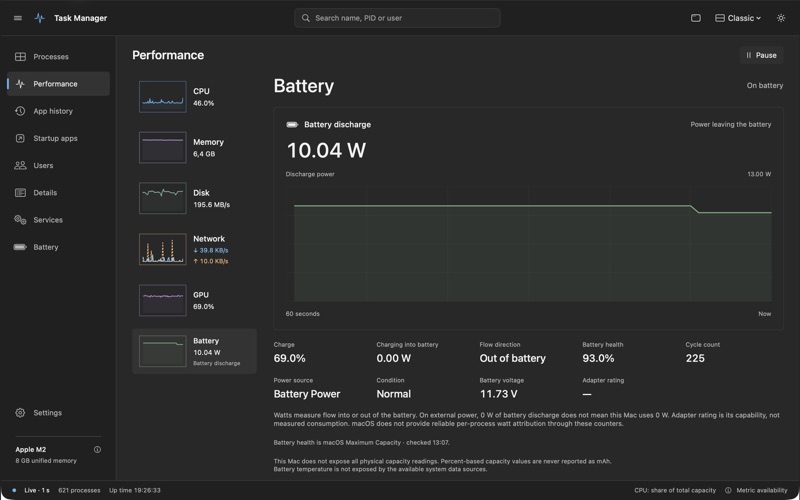
FOLLOW YOUR MAC • Watch every logical processor at once in a balanced grid, or choose overall CPU utilization. • Follow memory use and SSD activity with live graphs. • See download and upload as separate lines, with the default network interface first. • View integrated GPU utilization when the driver exposes a usable counter. • Read battery charge, maximum capacity, cycle count and power flowing into or out of the battery in watts, where available.
YOUR CHOICE OF MONITOR Choose any combination of CPU, memory, SSD, network and battery in a resizable floating window. Pin it above other windows and choose whether to show graphs.
Add a configurable desktop widget for periodic snapshots. Its “Sampled” label shows the age of the reading. macOS controls desktop-widget refresh timing; use the floating monitor for live updates.
LOCAL BY DESIGN Resource data stays on your Mac. No advertising, analytics, developer account or subscription. One paid download.
MACOS MEASUREMENTS, EXPLAINED The App Store edition shows process resident memory (RSS) when accessible. Shared pages can appear in more than one process. Protected counters and unsupported sensors show a dash. Per-app watts and Neural Engine utilization are not available. Battery watts describe flow at the battery and do not measure total computer power while plugged in. macOS Login Items, Battery settings and Activity Monitor handle system controls.
Requires an Apple Silicon Mac running macOS 15 or later. Intel Macs are not supported.
People rate it
Sign in to rate this app. Honest is what counts.
No ratings yet. Tried it? Be the first to rate it.