
Taskora: To Do List
Not claimedTaskora is the simple, beautiful to-do list and daily planner that helps you capture…
By Sarfrajbhai Sakhirani · Utilities





About
Taskora is the simple, beautiful to-do list and daily planner that helps you capture everything, focus on what matters and actually get things done.
And it's 100% free. No ads. No purchases. No subscriptions. No account. Every feature is yours from day one.
PLAN YOUR DAY • Today shows what to do now, what's coming up and what's running late — overdue tasks never quietly disappear • A clear daily progress ring keeps you motivated • Next Action suggests the best task to start and explains why • A gentle warning when your day is more than you can realistically do
CAPTURE IN SECONDS • Quick Add from anywhere with one tap • Type naturally — "Dinner with Sarah Friday at 7pm" — and Taskora spots the date for you • Add tasks from other apps with the Share Sheet • Home Screen and Lock Screen widgets, a Control Center button, and Siri & Shortcuts • An Inbox for everything on your mind, then sort it one by one
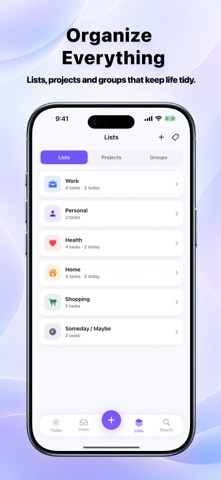
STAY ORGANIZED • Lists, projects and groups for work, home, health and everything else • Subtasks and checklists for bigger jobs • Priorities, tags and quick views • Ready-made templates to set up a project in seconds • Repeating tasks: daily, weekly, monthly or custom
NEVER MISS A THING • Reminders at the right time — or when you arrive at or leave a place • Due dates, start dates and deadlines kept clearly separate • Snooze or complete right from the notification • Quiet hours so reminders respect your evenings
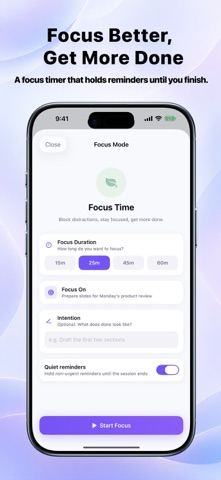
FOCUS BETTER • A built-in focus timer: 15, 25, 45 or 60 minutes • Holds non-urgent reminders until your session ends • Follow your timer on the Lock Screen and in the Dynamic Island
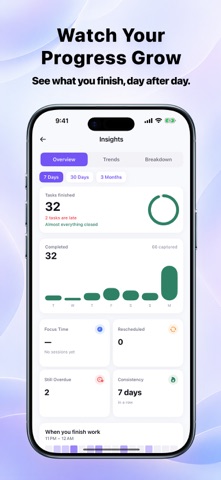
SEE YOUR WEEK • Calendar view of your tasks alongside your events • Block focus time on your calendar in one tap • Daily and weekly reviews to reflect and plan ahead • Insights show what you finish, your streaks and your most productive times
EVERY DETAIL IN ONE PLACE • Notes, files, photos and voice notes on any task • Text inside PDFs and images becomes searchable • Search that finds tasks even with a typo
MADE FOR YOU • Light and dark mode, plus alternate app icons • Supports Dynamic Type and VoiceOver • Works offline — your tasks are stored on your iPhone • Back up everything to a file and restore it on a new phone
WHY TASKORA IS FREE We built Taskora because everyone deserves a great to-do list — without ads, paywalls or a sign-up. If Taskora helps you, a rating on the App Store means the world to us and helps others find it.
Download Taskora and turn your to-do list into a plan you can finish.
People rate it
Sign in to rate this app. Honest is what counts.
No ratings yet. Tried it? Be the first to rate it.