
Taskroot: Task Planner
Not claimedTaskroot is a task manager where tasks are linked by what depends on what
By SIarhei Tarasenka · ProductivityWhy we expect it: The dependency chart concept is clearly explained, with a thorough description, nine languages and a strong value proposition for planners.


In short
Taskroot: Task Planner is a productivity app that lays out tasks as a linked chart, where each step unlocks once the steps before it are done. It is aimed at people who want to see the path to a goal and what they can act on now, across Mac, iPhone and iPad with iCloud sync. One notable feature is that it can turn a goal into a set of linked steps using Apple Intelligence on the device or Claude.
Summary by Debuts, based on the App Store listing.About
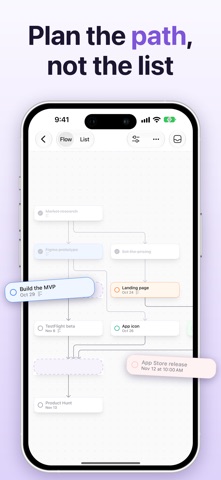
Taskroot is a task manager where tasks are linked by what depends on what. Instead of a long list, you see the path to your goal — and exactly what you can do right now.
PLAN THE PATH, NOT THE LIST • Put tasks on a chart and link them with arrows: a task becomes available when everything before it is done. • Build a plan from the goal backwards or step by step, with the keyboard or by touch. • The chart arranges itself, top to bottom or left to right.
EVERY DETAIL IN ITS PLACE • Notes, colour, tags, a due date and time, who it's delegated to, a place and attachments — in a card that unfolds right on the chart. • Upcoming, Anytime, Delegated and Completed lists across all your projects.
LET AI DRAFT THE PLAN • Make a Plan… turns a goal into steps with the links between them — brief, normal or detailed. • Suggest the steps before or after any task, with Apple Intelligence on your device or with Claude.
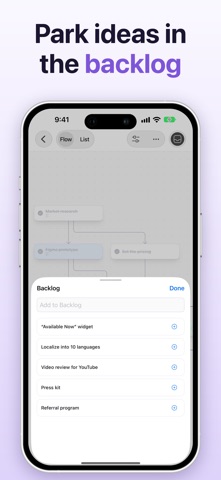
SEE IT YOUR WAY • Switch between the chart and a list in the order the work can be done. • Focus on one goal and everything else steps back; filter by tag, colour or what's available now. • Park ideas in the backlog and bring them onto the chart when it's time.
EVERYWHERE YOU WORK • Mac, iPhone and iPad, kept in sync through iCloud. • Quick entry from anywhere on your Mac, the share sheet, export to PNG and PDF. • Let AI assistants work with your projects over MCP.
TASKROOT PRO Two projects are free. Pro adds unlimited projects, plus plans and suggestions by Claude. Pro is a monthly or annual subscription.
Terms of Use: https://www.apple.com/legal/internet-services/itunes/dev/stdeula/ Privacy Policy: https://taskroot.tarasenka.me/privacy
People rate it
Sign in to rate this app. Honest is what counts.
No ratings yet. Tried it? Be the first to rate it.
More Productivity apps
Best new Productivity apps this week ChickMark: Habit TrackerChickMark is a simple habit tracker for routines, goals, and reminders
 Dayflint: One Thing a DayToo many priorities?
 Snappy Do ItTurn photos, text and voice into tasks, plans and more.
 Fristo CAFMFristo is the app for Fristo CAFM, the facility management software
 UhWhat? Voice NotesCatch the thought before it disappears
- BeginAnywayMorning alarm for hard tasks: set one task, prove you started, build a streak