
TDashCam for Tesla
Not claimedTDashCam helps you view and use dashcam footage from Tesla vehicles more easily and…
By SangHoo Joo · UtilitiesWhy we expect it: Clear, specific value for Tesla owners, with a detailed description and useful timestamp and driving-data overlays.
About
TDashCam helps you view and use dashcam footage from Tesla vehicles more easily and intuitively on iPhone and iPad. No complicated editing tools: load just the clips you need and see the flow of the drive at a glance.
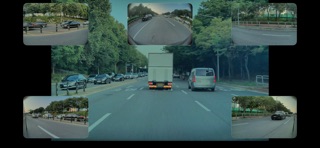
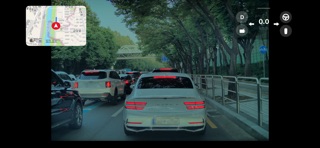
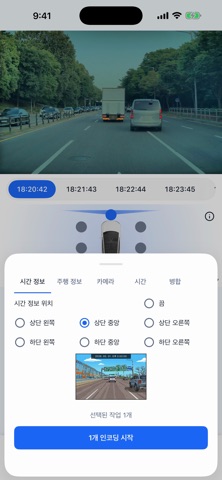
Key features • Save videos with timestamp and driving data Burn the capture time and driving data into the original footage and save it as a new video to Photos, ready to review and share. Place the time at the left, center or right, and show brake status, gear, turn signals, speed, FSD, steering angle, Autopilot and accelerator pedal along the bottom. You can also merge several cameras into one video.
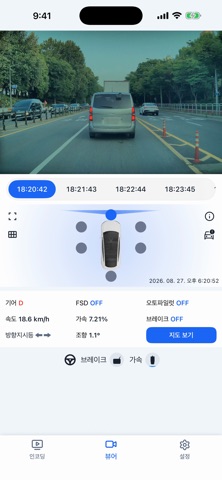
• Dashcam viewer (multi-camera) Switch quickly between the front, rear, left/right repeater and pillar cameras. Time-based tabs take you straight to the moment you want.
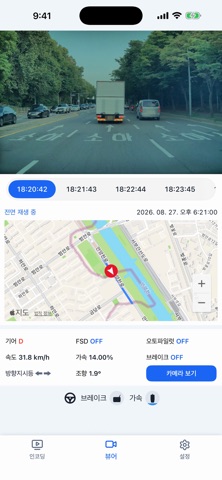
• Driving data (SEI metadata) For supported videos, gear, speed, brake, accelerator, turn signals and steering angle are shown in sync with the video. Videos without metadata still play normally.
• Route map When the video has location data, the route is drawn on a map and the current-position marker follows playback. Saved events can be played from 5 seconds before they happened.
• Multi-camera grid & landscape full screen Play up to 6 cameras at once in the grid view and choose the tile size (small, normal, large) in Settings. In landscape full screen, driving-info and map panels float and can be moved or collapsed. On iPad, the video and the map and driving data appear side by side.
• Load from your USB drive Connect the USB drive from your car, save the files to your iPhone or iPad with the Files app, then load them.
Who it is for • Anyone who needs footage with the time of driving for a report • Anyone who wants to check Tesla dashcam clips quickly • Anyone who wants a shareable video with time information for an incident • Anyone who wants to analyze a situation together with driving data
Good to know • Driving data is read from the data Tesla records inside the dashcam videos. Videos shared through the Tesla app or messengers may not include it. • Some features depend on whether the original video contains metadata. • Encoding and saving time depends on your device and the video length. • Videos and location data are processed on your device only and are never uploaded. • Free to use with ads and optional rewarded ads. A one-time purchase removes all ads and usage limits. • This app is not affiliated with Tesla, Inc.
TDashCam focuses on quick checking, easy export and clear analysis. Manage and use your Tesla dashcam footage more efficiently.
People rate it
Sign in to rate this app. Honest is what counts.
No ratings yet. Tried it? Be the first to rate it.