
Tea Timer & Journal: Gaiwan
Not claimedA record of the tea you drink
By Akos Komuves · Food and drinkWhy we expect it: The thorough listing and thoughtful gongfu timer with an offline catalogue serve tea enthusiasts very well.



In short
Tea Timer & Journal: Gaiwan is a tea-logging app with a gongfu steep timer, a cabinet for recording teas and teaware, and an offline catalogue of 243 entries covering teas, origins, teaware and terms. It suits tea drinkers who brew in multiple short infusions and want to track their sessions. Notable is an Apple Watch app that runs the steep timer from the wrist.
Summary by Debuts, based on the App Store listing.About
A record of the tea you drink.
Gaiwan keeps four things in one place: what is in your cabinet, how each pot actually went, where the leaf came from, and what any of it means.
THE CABINET Every tea is a card that opens on its own photo, with Brew right under it and a summary of how you brew it: your usual leaf, water and temperature, and the sitting you rated best. Fill in the rest over time — cultivar, altitude, the year it was picked, what you paid, how much is left. Photograph the package and most of it can be read for you, Chinese and Japanese labels included.
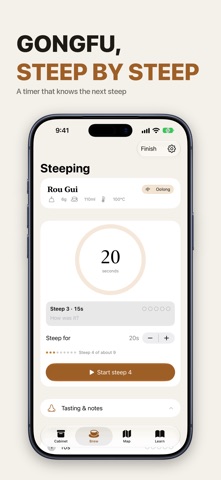
STEEP BY STEEP Gongfu is many short infusions rather than one long one, and the timer is built for that. It proposes a length for each steep, walks the times up as the session goes on, survives you leaving the app, and files your notes against the steep they belong to. Choosing a tea prefills leaf, vessel and water temperature from its brewing guide, scaled to the pot actually in your hands.
ON YOUR WRIST The steep timer runs on Apple Watch too: start, pause, add ten seconds, rate and log, with a tap when the cup is ready.
TEAWARE THAT REMEMBERS Record your pots, gaiwans and kettles. Porous clay absorbs a trace of every brew, so a pot committed to one type builds its seasoning — and the app warns you when a session would put the wrong category in it.
TWO MAPS One for where you drank, one for where the leaf grew. Both are drawn only from teas you have actually touched.
A CATALOGUE THAT WORKS OFFLINE 243 entries ship inside the app: 56 teas, 69 origins, 34 pieces of teaware and a 69-term glossary, searchable across English, pinyin and Chinese characters — so "rou gui", "Rougui" and 肉桂 all land on the same tea. Plus the groundwork: water, the six types, how to read a tea's name, tasting in order, storage, and each of the nine categories drawn as its processing chain.
Your sessions, your cabinet and your photos are stored on your device. Only what you send to be identified or summarised leaves it.
SUBSCRIPTION The cabinet, the timer, the watch app, both maps and the whole catalogue are free and stay free. Two things cost money to run, so they come with a subscription: identifying a tea or a piece of teaware from a photograph, and a written summary on each tea's card, drawn from your own sessions. Five identifications are free; after those, and for summaries, it needs a subscription:
• Gaiwan Identification Monthly — $3.99 per month • Gaiwan Identification Yearly — $24.99 per year
Payment is charged to your Apple Account at confirmation of purchase. The subscription renews automatically unless it is cancelled at least 24 hours before the end of the current period, and your account is charged for renewal within 24 hours before the period ends. Manage or cancel your subscription in your Apple Account settings after purchase.
People rate it
Sign in to rate this app. Honest is what counts.
No ratings yet. Tried it? Be the first to rate it.
More Food and drink apps
Best new Food and drink apps this week RecipeCat: Recipe to BrandHave a recipe people love?
 EGMenus: Restaurant MenusKnow what to order before you sit down
 Timpla: Asian Home CookingMost recipe apps hand you a list of steps and wish you luck
 Lanatag: Food & Menu ScannerScan a product barcode or photograph a restaurant menu in any language: Lanatag tells…
 Recipe CostsKnow what every bake costs you — and charge what you’re worth
 Léon - Les restos de tes amisLéon est une carte des restaurants votés par tes amis