
TechDeck Eos Remote
Not claimedTechDeck Eos Remote turns an iPhone or iPad into a wireless remote for ETC Eos family…
By Ryan Hall · UtilitiesWhy we expect it: Clear, privacy-respecting remote for ETC Eos consoles, with a facepanel layout that matches the physical desk.


In short
TechDeck Eos Remote turns an iPhone or iPad into a wireless remote for ETC Eos family lighting consoles over the local network. It is aimed at lighting operators, with facepanel keys placed as on the console and pages for each desk section on iPhone. One notable point is that it collects no accounts, analytics or tracking data.
Summary by Debuts, based on the App Store listing.About
TechDeck Eos Remote turns an iPhone or iPad into a wireless remote for ETC Eos family lighting consoles: Eos, Ti, Gio, Ion, Ion Xe, Element and ETCnomad.
The facepanel keys sit exactly where they do on the console, so there's nothing new to learn. On iPad you get the whole hardkey layout at once. On iPhone, pages show each section of the desk with large keys, and turning the phone sideways gives you the full main keypad.
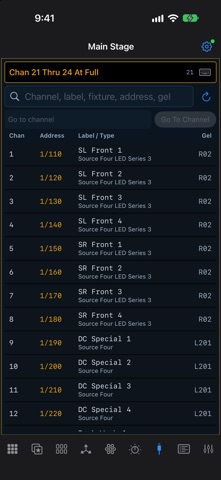
• Facepanel: every hardkey in its console position, with live softkey labels and a level wheel • Encoders: the current selection's parameters by category, with coarse and fine control • Focus: pan/tilt trackpad or absolute pad, plus zoom and edge • Color: hue/saturation picker that follows the console, with color palettes • Direct selects: two banks of any target type, with paging and Flexi • Patch: search the patch, edit labels, gels and notes, select or check channels • Playback: live cue list with active and pending cues, Go and Stop/Back with a safety lock • Faders: OSC faders with paging, Fire, Stop and Load • Command line in Live and Blind colors, with a keyboard for typing commands • Its own OSC user, so the remote has a command line separate from the programmer • Finds consoles on your network, saves consoles and reconnects automatically • Built-in OSC log for troubleshooting
No accounts, no analytics, no tracking. The app talks only to the consoles you choose on your local network.
Requires an ETC Eos family console or ETCnomad on the same network with OSC enabled (Setup > System > Show Control > OSC). Connects over TCP port 3032, or 3037 with Third Party OSC.
TechDeck Eos Remote is an independent app and is not affiliated with or endorsed by Electronic Theatre Controls, Inc. ETC, Eos, Ion, Gio and Element are trademarks of Electronic Theatre Controls, Inc.
People rate it
Sign in to rate this app. Honest is what counts.
No ratings yet. Tried it? Be the first to rate it.
More Utilities apps
Best new Utilities apps this week Drainly: Speaker CleanerMuffled speaker after a splash, rain, or a sweaty workout?
 Photo & PDF Resize: KBFile too large to upload?
 Arvectum Proxy LauncherArvectum Proxy Launcher is a network utility that routes your iPhone through a proxy you…
 BillVoice : Lecteur de billetsPointez votre iPhone vers un billet, touchez l’écran n’importe où et entendez ce que…
 Look Twice: Scam & AI CheckLook twice before you click
 Vodoalarm: vodostaji BiHVodoalarm javlja kad tvoja rijeka naglo raste, pa ne moraš stalno gledati vodostaje