
Tempus World Clock
Not claimedTempus is a world clock and time zone converter built for people who work, travel, and…
By Viktor Gamov · Utilities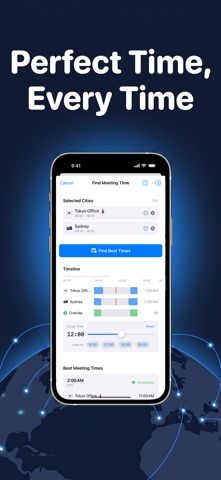





About
Tempus is a world clock and time zone converter built for people who work, travel, and stay in touch across time zones. It is at home on iPhone, iPad, and Apple Watch.
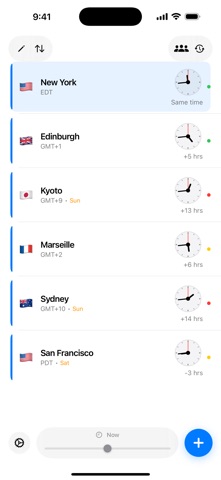
NAME YOUR CLOCKS Add clocks for cities or for the people you talk to. Give each one a custom name, an emoji, and a color tag so "Mum in Sydney" or "Design team, Berlin" is readable at a glance. Choose emoji from a searchable catalog with recents and suggestions for the city. Pick analog or digital faces, 12 or 24 hour time, and see the time difference from wherever you are.
CONVERT TIMES INSTANTLY Pick any time in any zone and see it in all your clocks at once. Drag the time scrubber to slide through the day and watch every clock move together. Day and night indicators show who is awake.
FIND A MEETING TIME THAT WORKS Select two or more clocks, set working hours for each, and Tempus shows the overlapping windows where everyone is available. Add the meeting to your calendar in one tap or share it as an .ics invite.
CITY DETAIL Tap any clock for a full city view: a skyline illustration that changes with the time of day, sunrise and sunset on a daylight arc, and current weather conditions.
IPAD On iPad, Tempus uses a native split layout: browse your clocks in a sidebar while City Detail stays open beside them. Time Converter and Meeting Finder open in the detail column with room for a full-width overlap timeline. Keyboard shortcuts and pointer hover are supported throughout.
APPLE WATCH Tempus on Apple Watch shows your clocks on your wrist, lets you convert times with the Digital Crown, and offers complications for your favorite clocks. Clocks sync instantly between iPhone and Apple Watch.
WIDGETS AND SYNC Home Screen widgets keep your clocks in view. Your clocks sync across all your devices with iCloud.
PRIVACY FIRST Tempus has no account, no ads, and no tracking. Your clocks are stored on your device and in your private iCloud database. Weather is provided by Apple Weather for the cities you add, never for your own location.
People rate it
Sign in to rate this app. Honest is what counts.
No ratings yet. Tried it? Be the first to rate it.